 DRM-X 6.0
MovieStudio PHP and app tutorial
Build a movie service with rentals, purchases, subscriptions and offline playback across Web, Android, iOS and Huawei WisePlay.
1. Try the finished MovieStudio demo#
MovieStudio demonstrates a small movie service built with a PHP storefront and API, a Web player, and native Android, iOS and Huawei WisePlay apps. The same viewer account and movie entitlement authorize each platform.
Open the live MovieStudio demo
Sign in with testuser@drm-x.com and password test. These values are prefilled. This shared viewer account belongs to the demonstration. Other visitors can change its orders, subscription and device reservations.
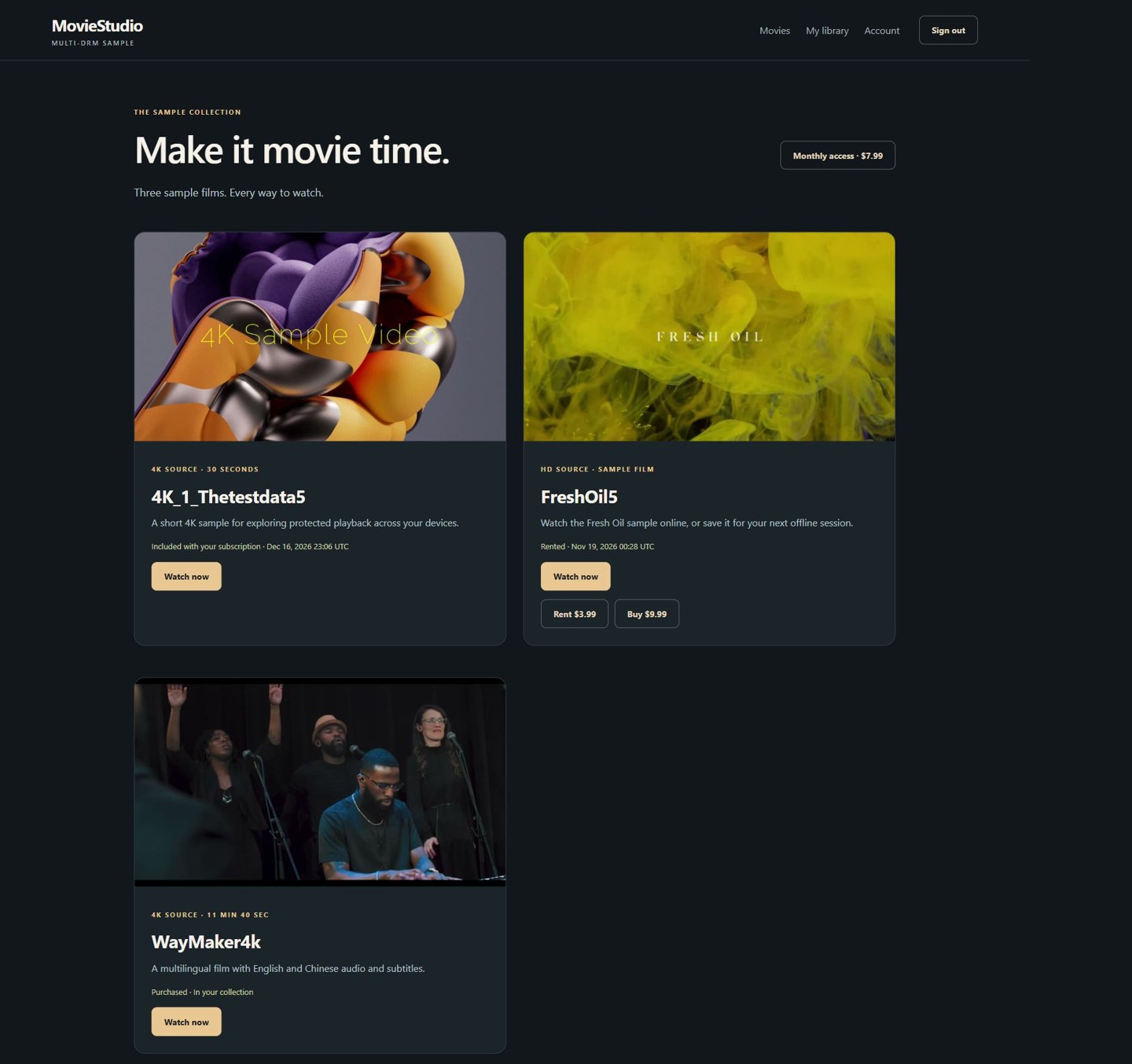
- Open Movies and choose a film. Use Monthly access for 4K_1_Thetestdata5. Use Rent or Buy for FreshOil5 and WayMaker4k.
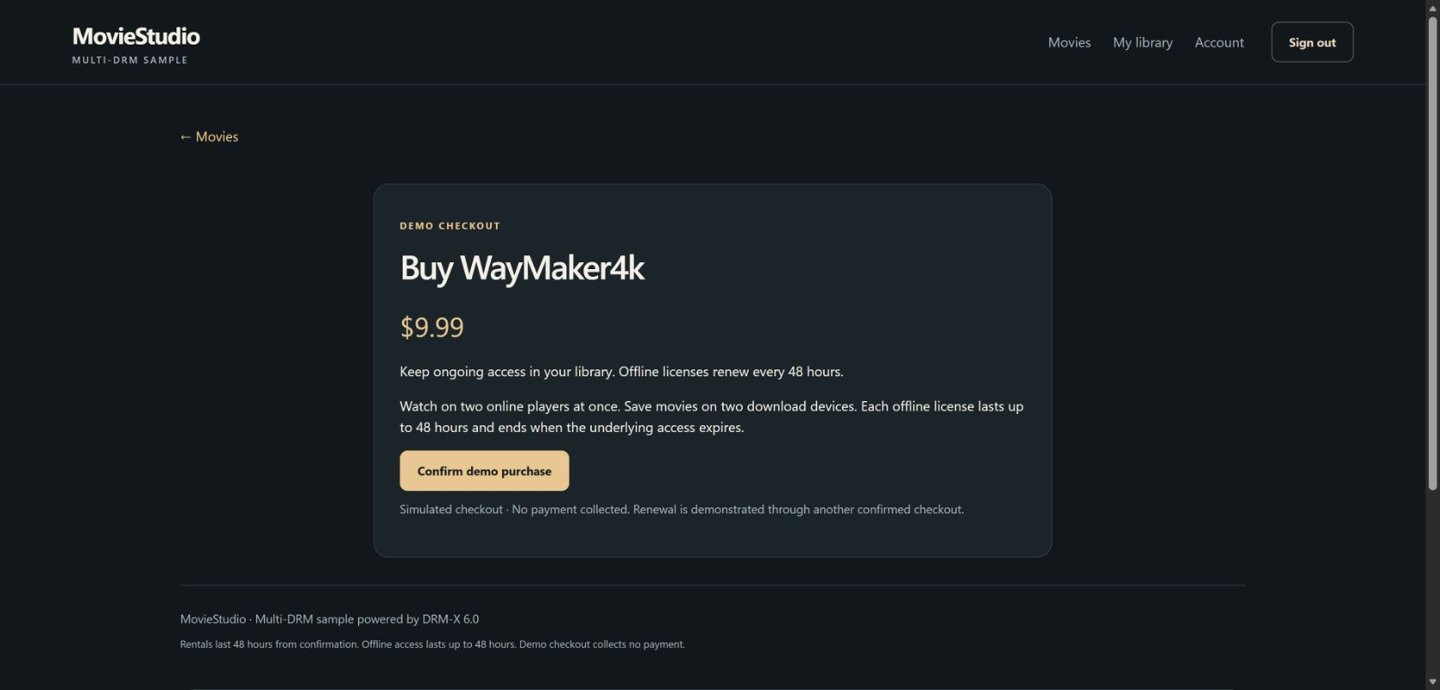
- Confirm the simulated order, then choose Watch now.
- Open player settings to select available quality, audio and subtitles. Choose subtitles off when wanted.
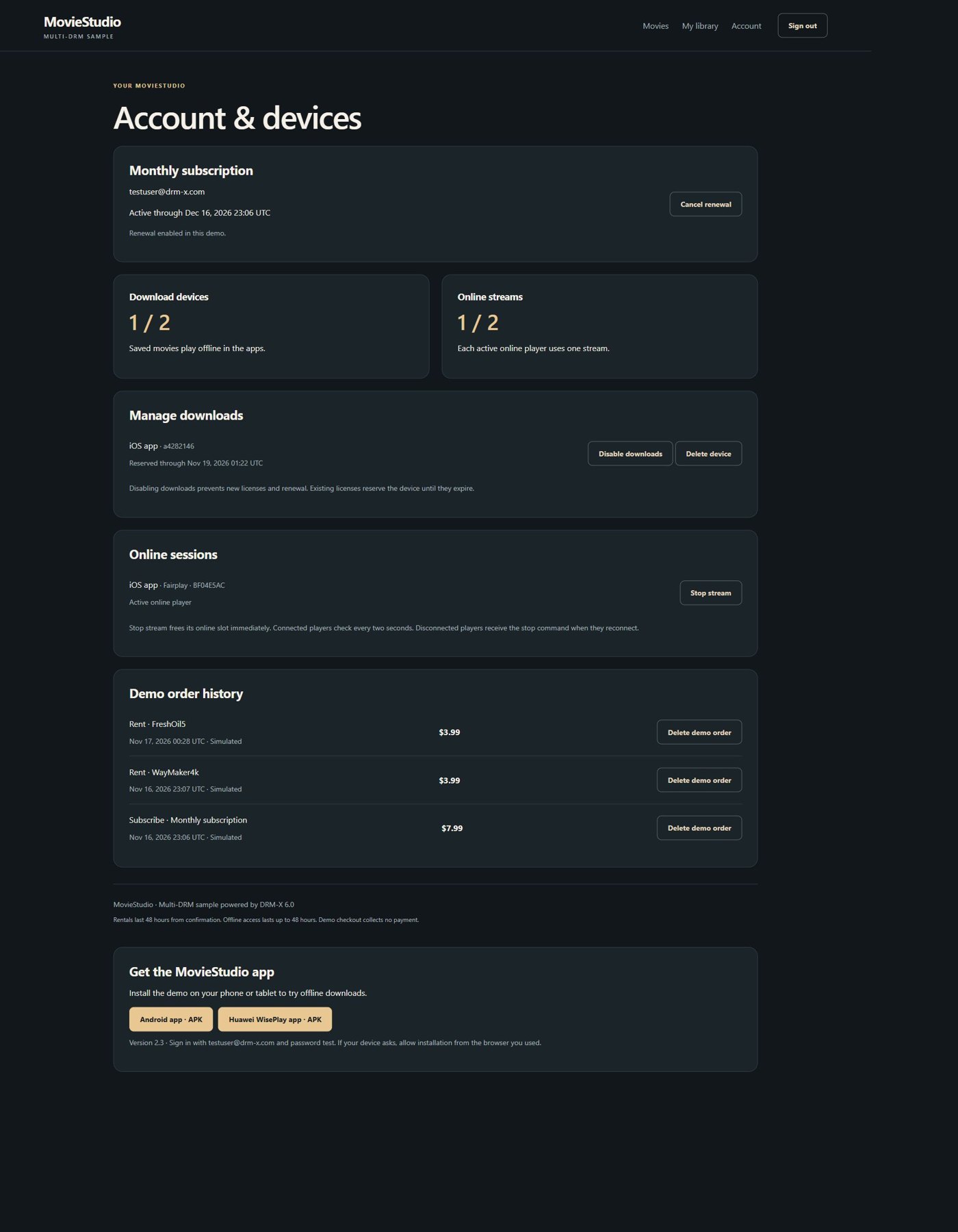
- Open Account to inspect orders, download devices and online streams. Use Delete demo order to repeat a checkout. This recalculates access from remaining orders.
| Offer | Demo title | Access rule |
|---|---|---|
| Rent · USD 3.99 | FreshOil5 or WayMaker4k | Start within 30 days of checkout. First playback starts a fixed 48-hour viewing window, including offline playback. A first play in the final hour still receives 48 hours. |
| Buy · USD 9.99 | FreshOil5 or WayMaker4k | Ongoing account access. Each offline license lasts 30 days and can be renewed online. |
| Monthly · USD 7.99 | 4K_1_Thetestdata5 | A 30-day term. Streaming and downloads expire at the paid-through date. Canceling renewal preserves the already-paid term. |
The published Android and Huawei apps can be installed directly for evaluation. iOS builds are tested on a connected device. TestFlight distribution is currently deferred by the demo owner.
2. What commercial use means#
Customers can adapt the sample storefront and app integration code, or move its authorization endpoints into an existing business system. A commercial service uses its own branding, viewer accounts, content rights, payment processing, DRM-X environment and app signing identities.
Building and using apps with the DRM-X Universal Player SDK requires an active Professional or Enterprise account, including an approved Professional evaluation where applicable. Obtain the licensed dependencies through Console → Developer Tools → Device SDKs. Public tutorial/source downloads and the prebuilt evaluation apps are available for learning. The hosted viewer login provides access to the demo service.
Follow your DRM-X SDK and service agreement for permitted commercial use, distribution and subscription terms. Media rights, Apple or Android publishing accounts, payment fees and your service operations are supplied by your business. The sample checkout records simulated orders and collects no payment.
For paid operation, grant access only after validating a payment-provider callback on your server. Match its amount, currency, product and purchaser, then record the confirmed transaction idempotently. Map refunds, cancellations and subscription renewal events to the same entitlement resolver.
3. Follow the authorization and media flow#
From movie selection to protected playback
The same PHP entitlement decision serves the website and all three native app targets.
- Viewer and app
Sign in, choose a movie and send the viewer session to the PHP API.
- PHP business rules
Check rental, purchase or subscription access and reserve an online slot.
- DRM-X license service
Apply the content and device policy, then issue a DRM License Token.
- Player and media storage
Acquire the native DRM license and play encrypted DASH or HLS media.
The PHP application owns the account and purchase decision. DRM-X issues a short-lived DRM License Token with the permitted content and license policy. The player uses that authorization for the device DRM exchange and loads encrypted media from its published storage URL.
| Component | Responsibility | Source entry point |
|---|---|---|
| PHP business model | Catalog, offers, orders and entitlement deadlines. | web/src/movies.php |
| PHP account and limits | Viewer authentication, stable installation identity, online leases, download reservations and license policy. | web/src/customer.php |
| PHP app API | JSON login, account, checkout and management actions. | web/src/app.php |
| Web storefront | Movie cards, checkout, account controls and browser player. | web/src/home.php |
| Android and Huawei | App screens, player lifecycle, download selection and saved-media integration. | MainActivity.kt and OfflineVideo.kt |
| iOS | SwiftUI screens, AVFoundation/FairPlay playback and offline state. | ios/App/SubscriptionSample.swift |
Server credentials stay in the private PHP configuration. Apps send a viewer session token to your API. A Content ID is checked against the authenticated viewer before your server asks DRM-X for a license.
4. Download the PHP and app projects#
Extract both ZIP files into one folder. Each ZIP has the same top-level moviestudio/ directory. The app ZIP contains application source, build files and a dependency-preparation helper. The matching player dependencies are supplied separately through the authenticated SDK download.
- PHP storefront and API source · ZIP (0.32 MB)
SHA-25649eb18d95bb8c3ba531cddcd3e7556d5a2b92bde23cfc3aab634b8204d37f43e - Android, iOS and Huawei app source · ZIP (2.02 MB)
SHA-256fb0a90a8a05f8ae7f8d122e977a493a83af04d68a5296a05975b0d99091ddafd
moviestudio/
  web/                       PHP storefront and API
  android/                   Android app and shared Huawei screens
  wiseplay/                  Huawei application target
  ios/                       SwiftUI app and Xcode project
  tools/prepare-player-sdks.py
  SDK-REQUIREMENTS.json       Required SDK filenames and SHA-256 hashes
  README.md
In Console, download Android SDK bundle 20261117.4 for Android/Huawei and Apple SDK bundle 20261117.4 for iOS. These bundles include the tested MovieStudio dependency snapshots alongside the standard SDK. Run the helper with Python 3.11 or newer from moviestudio/.
python -B tools/prepare-player-sdks.py --android-zip /path/to/drmx-android-sdk-20261117.4.zip
python -B tools/prepare-player-sdks.py --apple-zip /path/to/drmx-apple-sdk-20261117.4.zip
The helper verifies the exact licensed ZIP checksum before installing dependencies. It creates android/maven, wiseplay/player and ios/SDK as appropriate. Keep the Android and Huawei folders adjacent so shared source paths resolve.
5. Publish your own protected movies#
- Sign in to your DRM-X Console and select the environment for this service.
- Use the Packager to encode and encrypt your movie. Include the required resolutions, audio languages and subtitle files.
- Publish DASH/CENC for Widevine, PlayReady and WisePlay, and HLS/CBCS for FairPlay. Verify WisePlay signaling in the DASH manifest used for both online and offline playback.
- Copy the Published Content ID and registered manifest URLs. Update the three sample catalog entries and your server-side mappings.
- Create an environment-scoped API client for license-token issuance and save its Access Key securely on the PHP host.
For different protection rules at SD, HD and UHD, package separate quality keys. MovieStudio's license rules permit software DRM for audio/SD, require hardware protection for HD on Widevine/PlayReady/WisePlay, and apply stronger output protection at UHD. A licensed quality limit and the actual decoder/display capabilities both affect available quality.
Illustrated Packager setup · Create server credentials · License-policy reference
6. Configure and run PHP#
- Install PHP 8.2 or newer with PDO SQLite, cURL and OpenSSL.
- Copy
web/config/customer.local.example.jsonto a private path outsideweb/public. - Set your Environment ID as
siteId, API client ID assiteKey, and server Access Key asaccessKey. Configure the exact Content IDs inweb/src/movies.phpand matching DASH/HLS URLs in the private JSON. - Set
CUSTOMER_SAMPLE_CONFIG_FILEto that JSON path andCUSTOMER_SAMPLE_STORAGEto a private writable directory. UseCUSTOMER_SAMPLE_BASE_PATHwhen mounting below a URL prefix. - Serve the application over HTTPS. Route the chosen prefix to
web/trial-router.phpand useweb/publicas the document root. - Create a test viewer, sign in, confirm a demo order and verify Web playback before connecting an app.
{
  "siteId": "YOUR_ENVIRONMENT_ID",
  "siteKey": "YOUR_API_CLIENT_ID",
  "accessKey": "YOUR_SERVER_ACCESS_KEY",
  "contentId": "YOUR_SUBSCRIPTION_CONTENT_ID",
  "dashManifestUrl": "https://media.example.com/movie/manifest.mpd",
  "hlsManifestUrl": "https://media.example.com/movie/master.m3u8",
  "allowedFairPlayClients": [],
  "plan": { "downloadDevices": 2, "onlineStreams": 2, "offlineSeconds": 172800 },
  "publicDemo": { "enabled": false }
}
Keep credentials out of the app, screenshots and source repository. For a local website check, PHP's development server can serve web/trial-router.php. Use a trusted HTTPS endpoint reachable by the device for protected playback.
# Set CUSTOMER_SAMPLE_CONFIG_FILE and CUSTOMER_SAMPLE_STORAGE in your shell first.
# Set CUSTOMER_VIEWER_PASSWORD to a private test password of 12–72 bytes.
php web/tools/create-viewer.php viewer@example.com
CUSTOMER_SAMPLE_PREVIEW=1 php -S 127.0.0.1:8788 -t web/public web/trial-router.php
The loopback preview supports account and UI checks. On Windows set $env:CUSTOMER_SAMPLE_PREVIEW = '1' before starting PHP. Test DRM using your trusted HTTPS deployment with preview disabled.
Qualify FairPlay on your iOS/iPadOS client before adding ios or ipados to allowedFairPlayClients for HD. The sample starts conservatively when that list is empty. A multi-instance production deployment needs shared transactional account and reservation storage.
7. Connect the apps to the same PHP API#
Open the app's sign-in screen and replace Customer site URL with your HTTPS MovieStudio base URL. Sign in using a viewer from that backend. Keep a stable installation UUID and scope saved content to the backend and viewer.
| Request | Purpose |
|---|---|
POST /api/app/login | Validate email/password and installation, then return the app session token. |
GET /api/app/account | Load catalog, entitlements, orders and account usage. |
POST /api/app/checkout | Confirm the demo offer using a stable request ID for safe retries. |
POST /api/drmx/app/playback-session | Check access and reserve an online slot before issuing playback authorization. |
POST /api/drmx/offline-license-session | Acquire, renew or release the persistent license for the selected movie. |
POST /api/app/stop-stream | Revoke an owned online session and free its slot. |
POST /api/app/delete-device | Remove an owned download installation and free its server reservation. |
POST /api/app/checkout
Authorization: Bearer VIEWER_APP_SESSION
Content-Type: application/json

{
  "offer": "rent",
  "contentId": "YOUR_MOVIE_CONTENT_ID",
  "requestId": "0d9f62c2-40a0-44fa-a034-8903575d104d"
}
The backend selects prices and validates the offer. Reuse a checkout request ID only for retrying the same operation. A new purchase attempt uses a new ID. Website forms use a same-origin session and CSRF protection.
The shared entitlement check in web/src/customer.php is called for both browser and app authorization.
function trial_authorize(string $viewer, string $content): bool
{
    [$device, $label] = trial_device();
    return movie_access((int)$viewer, $content)['active']
        && trial_installation((int)$viewer, $device, $label);
}
8. Build the Android app#
- Install Android Studio, JDK 17 and Android SDK 36. Prepare the licensed Android dependency with the helper in step 4.
- Open
android/. Gradle uses the local Maven repository forcom.haihaisoft.drmx:drmx-universal-player:1.0.0-beta.29. - Choose your own application ID and signing identity. For an update to an installed app, preserve its existing identity and download storage.
- Build and install on a physical Widevine-capable device. Enter your HTTPS backend, sign in and choose an entitled movie.
- Test streaming, pause/resume, seeking, audio/subtitles and landscape before testing downloads.
# Windows, from moviestudio/
powershell -ExecutionPolicy Bypass -File tools/build-android.ps1

# macOS or Linux, from moviestudio/android/
sh gradlew :app:assembleDebug :app:lintDebug
The Windows helper prints the built APK path under local-data/tmp/android. The application integrates DrmXUniversalPlayer with a viewer-token callback. Its OfflineVideo class coordinates Media3 downloads with DrmXOfflineManager. Native DRM enforces the persistent license when a saved movie is played.
The player callback passes the signed-in viewer authorization to your PHP endpoint. This excerpt is the authentication portion of MainActivity.kt.
authenticate = DrmXAuthenticationProvider { _, done ->
    if (canManage) {
        if (streamId.isEmpty()) streamId = UUID.randomUUID().toString()
        checking = true
        handler.removeCallbacks(heartbeat)
        handler.postDelayed(heartbeat, 2000)
        done(Result.success(mapOf(
            "Authorization" to "Bearer $token",
            "X-DRMX-Playback-Id" to streamId
        )))
    } else {
        done(Result.failure(IllegalStateException("Connect and sign in to continue.")))
    }
    null
}
9. Build the Huawei WisePlay app#
- Prepare the same licensed Android SDK ZIP. Its MovieStudio companion supplies
wiseplay/player. - Open
wiseplay/in Android Studio. Keepandroid/adjacent because the Huawei target shares its storefront and account screens. - Build the Huawei application and install on an Android-compatible Huawei device with WisePlay support.
- Confirm the server accepts
wiseplaysessions and that your DASH manifest contains the matching WisePlay protection signaling. - Test a completed download with networking disabled, then reconnect and renew its license.
# Windows, from moviestudio/
powershell -ExecutionPolicy Bypass -File tools/build-android.ps1 -WisePlay

# macOS or Linux, from moviestudio/
sh android/gradlew -p wiseplay :app:assembleDebug :app:lintDebug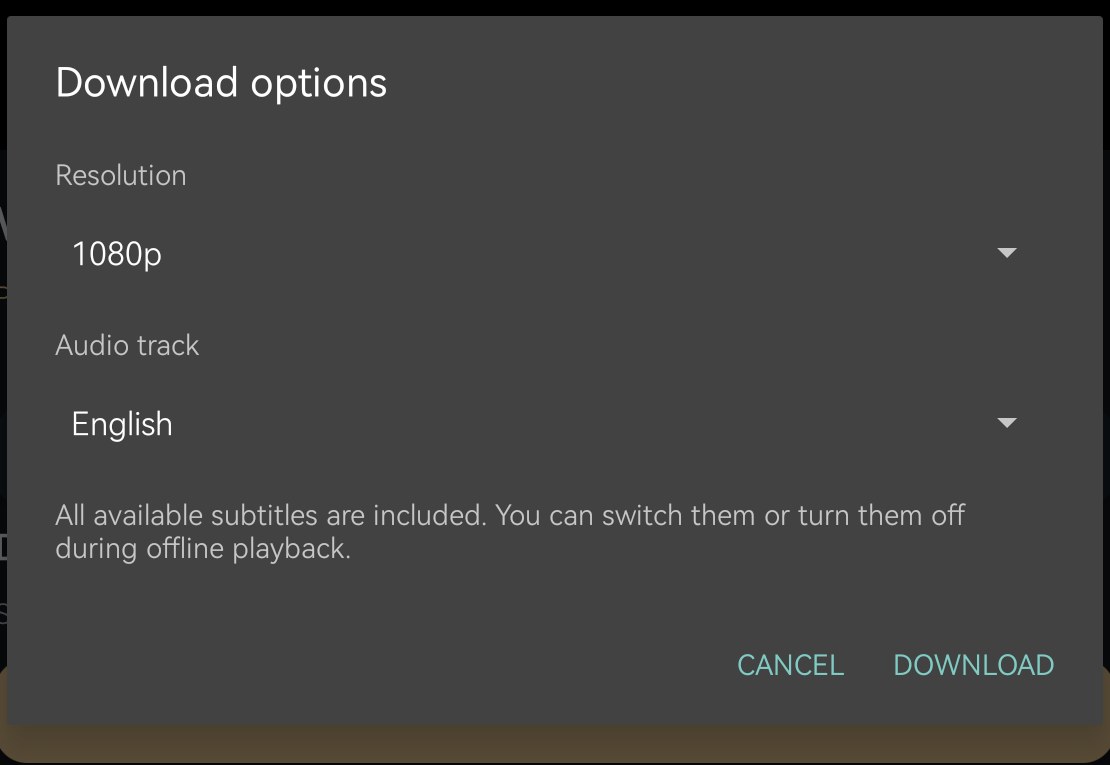
The sample-specific player adapter uses Huawei's system MediaDrm and reports SW/HW/EH capabilities. The demonstrated Huawei BAH3-W59 uses hardware-backed WisePlay. HarmonyOS NEXT needs a separate native integration. Validate each target model and OS version.
10. Build the iOS app#
- Use a Mac with Xcode. Prepare the licensed Apple dependency to create
ios/SDK. - Open
ios/SubscriptionSample.xcodeprojand choose the MovieStudio scheme. - Select your Apple development team and a customer-owned bundle identifier. The sample targets iOS 16 or newer and was archived with Xcode 26.3.
- Run on a physical iPhone or iPad. Enter your HTTPS backend, sign in and test the same movie entitlements.
- For team distribution, archive a Release build, validate it and upload through your App Store Connect account to TestFlight. Complete the encryption declaration for your own app.
xcodebuild -project ios/SubscriptionSample.xcodeproj \
  -scheme MovieStudio -configuration Release \
  -destination 'generic/platform=iOS' \
  -archivePath local-data/MovieStudio.xcarchive \
  -derivedDataPath local-data/DerivedData \
  DEVELOPMENT_TEAM=YOUR_TEAM_ID -allowProvisioningUpdates archive
SubscriptionSample.swift embeds the player and configures its authenticated backend requests. AVFoundation handles HLS playback and asset downloads. The FairPlay integration stores a persistent content key and uses the saved asset for offline playback. Keep the AVPlayer surface and storage identity stable across fullscreen transitions and app updates.
The Swift authentication closure follows the same viewer-session contract. The project contains the surrounding login, download and player-lifecycle code.
var headers = ["Authorization": "Bearer " + credentials.token]
if !credentials.playbackId.isEmpty {
    headers["X-DRMX-Playback-Id"] = credentials.playbackId
}
return headers
11. Test downloads, renewal and the two independent limits#
Download once and renew the offline license
Downloaded media and the persistent license have separate lifecycles.
- Choose tracks online
Select the permitted resolution and audio language. Include available subtitles.
- Reserve and download
Check the download-device allowance, acquire a persistent license and save the encrypted media.
- Play offline
Open the completed local download with its saved native DRM license.
- Reconnect and renew
Recheck the viewer entitlement and renew the license while retaining the downloaded media.
- Sign in and acquire access to the movie. Choose Download, a permitted resolution and one audio track. Include all available subtitle languages.
- Wait for both the media transfer and persistent license to complete.
- Disable networking and open the saved movie. Test seeking, subtitles on/off, language switching and an app restart.
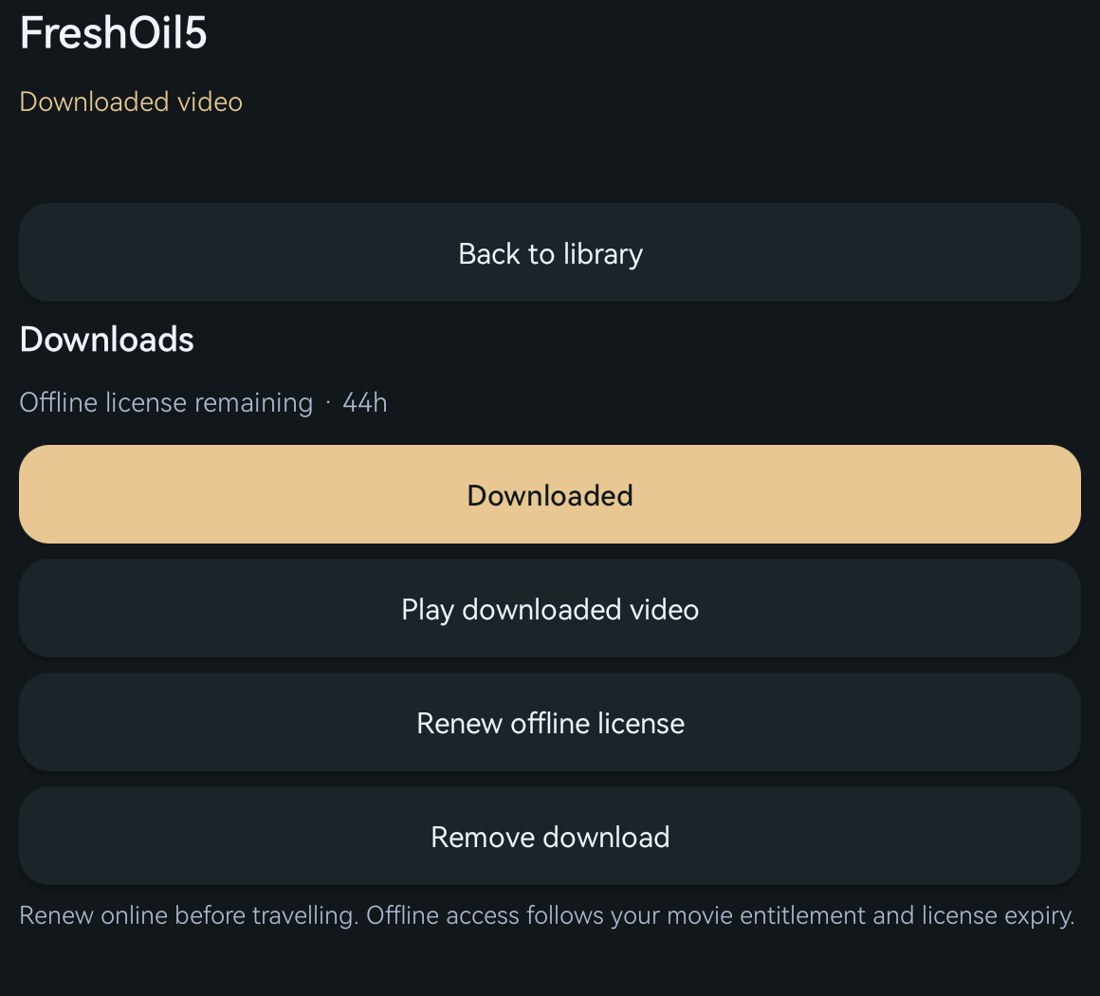
- For a purchase or subscription, reconnect and choose Renew offline license. Confirm the deadline follows that access type and the downloaded media remains available. For rentals, confirm renewal is unavailable and the deadline stays fixed.
- With two devices playing completed downloads offline, open two online players. A third online player should show the account-limit message.
- Use Account → Stop stream, then verify the connected player stops and the slot is available. Test download-device deletion separately.
Each account allows two download installations and two simultaneous online streams. The online counter lives in the PHP business layer. Offline playback uses its saved license and consumes no online slot. Rental downloads carry the remaining 30-day start window and a 48-hour first-play window. Downloading an unwatched rental keeps its start deadline. Use Watch to open the player, then choose Play or Download. Opening the player and downloading keep the first-play clock unstarted. Rental renewal is disabled for both existing and new rentals. Purchased movies receive renewable 30-day offline licenses. Subscription downloads expire at the paid-through date and renewal extends them only after another paid term is confirmed. Existing rentals retain their original terms.
The active DRM-X Device SDK entitlement also bounds native license expiry. The PHP response returns the issued durations when that term ends before the requested movie window. Keep your commercial SDK entitlement active for the complete offline period you offer.
Apps save the first-play time and synchronize it with PHP when connected. Earlier first-play receipts shorten the account deadline. A device that is already disconnected learns about another device’s earlier playback after reconnecting. Native DRM enforces each issued offline license locally. Rent and Buy are hidden during an active rental and return after expiry.
Connected clients check the stop state every two seconds. A disconnected client receives the command after reconnecting. Previously issued offline licenses remain valid until their signed expiry. The demo uses a longer WisePlay streaming lease to accommodate the protected-clock offset measured on the test tablet.
12. Adapt the sample for your service#
Replace the three demo titles, mock checkout and shared viewer account with your catalog and payment events. Reuse movie_access as the central entitlement decision, or connect it to your existing system. Keep authorization, quota admission and license issuance consistent when an operation is retried or canceled.
| Customer change | Keep in place |
|---|---|
| New catalog and prices | Server-owned Content ID/offer validation and idempotent order handling. |
| Your login and subscription service | Per-viewer entitlement checks on every playback and renewal request. |
| Your app design | Player lifecycle cleanup, stable storage scope, native DRM checks and clear limit/error messages. |
| Your device/stream plan | Transactional reservations, expiry, ownership checks and authenticated release. |
| Your production hosting | HTTPS, private credential storage, backups and a shared transactional store when using multiple nodes. |
Complete acceptance on your own content and target devices before launch. Verify successful playback and expected denial, interruptions, expiry, renewal and account management. The published demo shows these integration patterns with a small catalog and simulated billing.
Android Media3 download request reference · Apple offline asset-download reference