 DRM-X 6.0
Vega OS-এর জন্য Amazon Fire TV SDK
Build a native Amazon Fire TV app with DRM-X Universal Player: download eligibility, screenshots, Vega setup, viewer authentication, configuration, build and device testing.
SDK ZIP-এর DEMO-QUICKSTART.md অনুসরণ করে PHP ডেমো চেষ্টা করুন। নিজের কনটেন্ট ব্যবহার করতে প্রথমে ওয়েবসাইট ও ব্যাকএন্ড ইন্টিগ্রেশন সম্পন্ন করুন, তারপর MOBILE-AND-TV-APPS.md অনুসরণ করে অ্যাপটিকে একই লগইন ব্যবস্থা ও দেখার অনুমতির নিয়মের সঙ্গে যুক্ত করুন।
Amazon Fire TV: build a native Universal Player app#
Use the DRM-X 6.0 Universal Player SDK to build your own Amazon Fire TV app for Vega OS. The sample uses React Native controls and the native Vega media surface for protected Widevine DASH playback. It does not embed a web page.
Check the device operating system first. This package targets Vega OS 1.2 and armv7; it is not an Android APK. For Android-based Fire OS, use the Android integration path and qualify your target device separately.
Android SDK · Universal Player SDKs
1. Download the customer SDK#
Developer Tools → Device SDKs থেকে ডাউনলোড করুন। SDK ব্যবহারে সক্রিয় Professional বা Enterprise অনুমতি প্রয়োজন; অনুমোদিত Professional মূল্যায়নও অন্তর্ভুক্ত। Standard-এ নিজস্ব প্লেয়ারের জন্য নেটিভ APIs থাকছে। সেশন তৈরি ও লাইসেন্স নবায়নের সময় SDK অনুমতি যাচাই হয়; অফলাইন লাইসেন্সের মেয়াদ অ্যাকাউন্টের সেবা সময়সীমার পরে যায় না।
Console → Developer Tools → Device SDKs · Professional / Enterprise
ZIP-এ SDK সোর্স, কনফিগারযোগ্য নমুনা অ্যাপ, build.py এবং armv7 .vpkg ইনস্টলার রয়েছে। ডাউনলোড কার্ডে প্রকাশের তারিখ ও SHA-256 চেকসাম দেখানো হয়। বিল্ডের সময় Amazon থেকে Amazon SDK নির্ভরতা নেওয়া হয়।
shasum -a 256 drmx-firetv-sdk-20260930.1.zip
cd drmx-firetv-vega-sdk
2. Prepare the build computer and Fire TV#
Use macOS or native Ubuntu with Amazon Vega CLI 1.3.4 / SDK 0.24.12044, Node.js 20+, Python 3.10+, Git and Java 21+. This release was built on an Apple Silicon Mac with Java 21. Install and authenticate Amazon tooling using its official instructions. A DRM-X subscription does not replace Amazon developer registration or device authorization.
Amazon: run your app on Fire TV · Amazon: native media setup
On Fire TV, open Settings → My Fire TV → Developer Options and enable Developer Mode using Amazon’s current device-authorization flow. Connect USB to the build computer when instructed. Authorize the device and computer; signing in to an Amazon web page alone is not the same as completing the Vega authorization flow.
For LAN testing, enable the device TCP/IP development connection and put Fire TV and the build computer on the same trusted network. Allow the Vega tools in macOS Privacy & Security → Local Network if prompted. Replace FIRE_TV_IP below with the device’s current address. This Vega connection uses VDA, not Android ADB.
export PATH="$HOME/vega/bin:/opt/homebrew/bin:/opt/homebrew/opt/openjdk@21/bin:$PATH"
export FIRE_TV_IP="YOUR_FIRE_TV_IP"
vega exec vda connect "$FIRE_TV_IP:5555"
vega device list
3. Try the included native player#
SDK আনজিপ করার পর তার ডিরেক্টরি থেকে সঙ্গে থাকা build 12 প্যাকেজ ইনস্টল করে চালু করুন। নমুনাটি DRM-X-এর সর্বজনীন ডেমো ক্যাটালগ ব্যবহার করে। অ্যাপে Site Key বা Access Key প্রয়োজন নেই। ইনস্টলারটি ডেভেলপমেন্ট পরীক্ষার জন্য, Amazon Appstore-এ প্রকাশিত অ্যাপ নয়।
vega device install-app -d "$FIRE_TV_IP:5555" \
  --packagePath installer/drmx-firetv-native-build12_armv7.vpkg
vega device launch-app -d "$FIRE_TV_IP:5555" \
  --appName com.haihaisoft.drmx.firetv.main
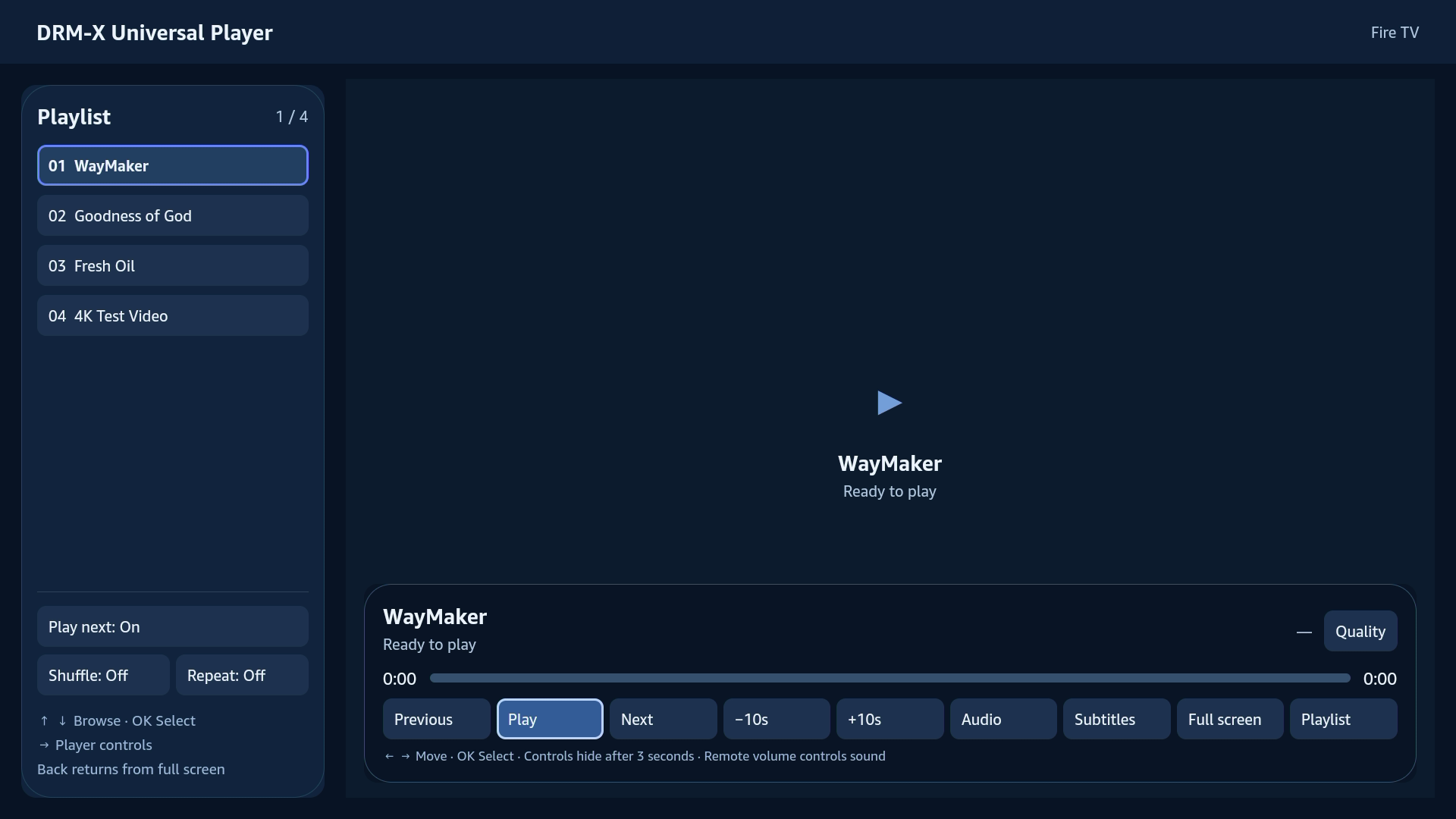
Select a playlist item and press OK. Play next is on by default: when an item ends, the app releases its playback session and starts the next item in order. Shuffle and Repeat are optional. Playback stops after the last item unless Repeat is enabled.
Full screen fills the video surface to the display, preserving the video’s aspect ratio. Controls hide after three seconds while playing. The first navigation or OK press reveals hidden controls without activating a button. Back closes a menu, exits fullscreen, stops playback, then leaves the app.
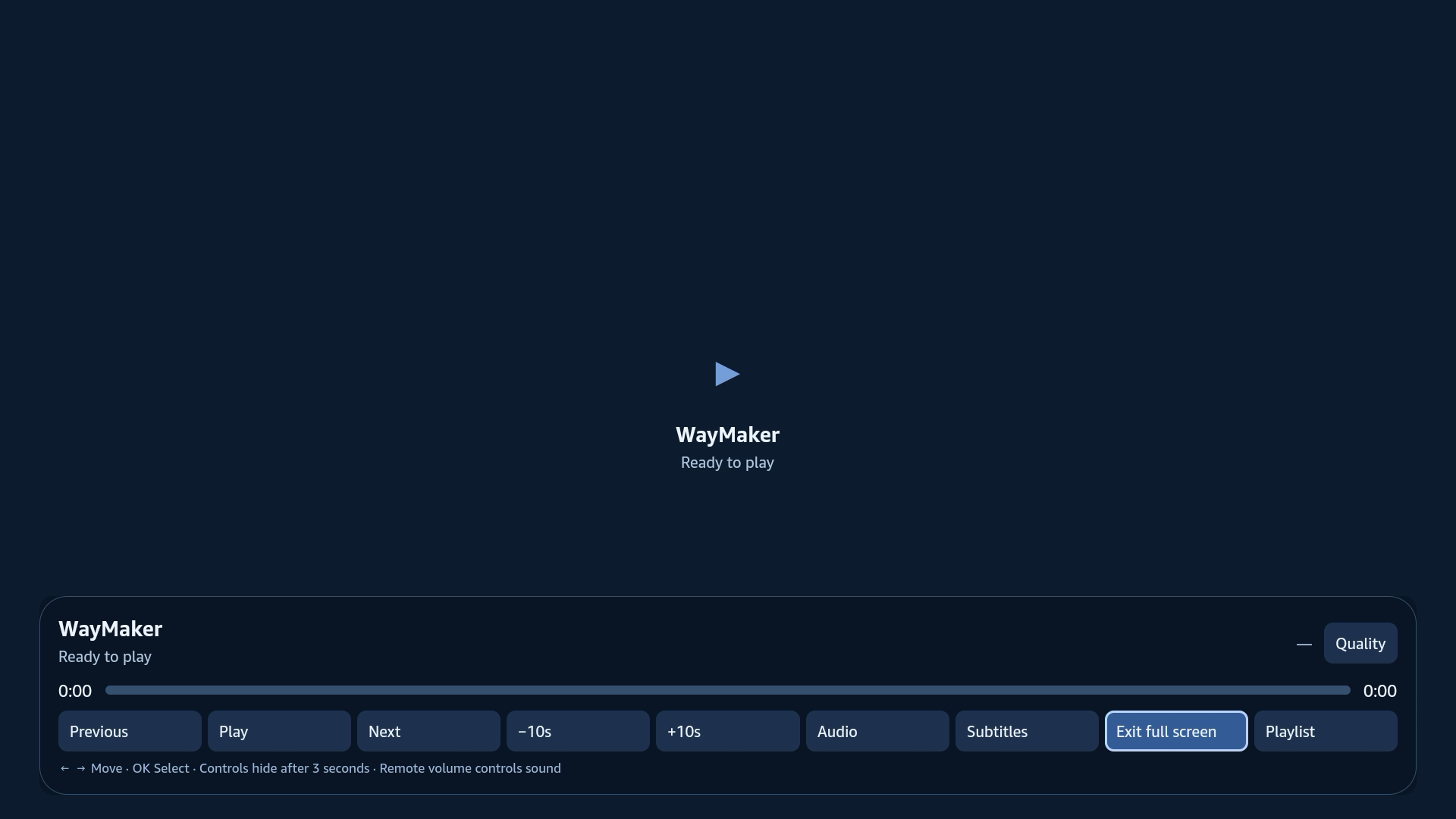
The number immediately left of Quality, such as 480p or 1080p, follows the active streaming variant. It is not the HDMI display resolution. Quality choices set a maximum resolution, subject to the backend policy and available tracks. Subtitles supports English and Chinese text tracks with a compact font; captions move above visible controls.
4. Configure your app and viewer login#
নিজের অ্যাপের জন্য app-config.json সম্পাদনা করুন এবং authentication.ts-এ authenticateViewer() বাস্তবায়ন করুন। অ্যাপের নাম, packageId, HTTPS সেশন এন্ডপয়েন্ট ও প্লেলিস্ট নির্ধারণ করুন। publicDemoAuthentication-এর মান false রাখুন। demo-config.json শুধু মূল্যায়নের জন্য ব্যবহার করুন।
{
  "appName": "My Video App",
  "packageId": "com.example.video.firetv",
  "accentColor": "#6488ff",
  "sessionEndpoint": "https://video.example.com/api/drmx/playback-session",
  "maximumHeight": 1080,
  "publicDemoAuthentication": false,
  "playlist": [
    {"contentId": "YOUR_PUBLISHED_CONTENT_ID", "title": "Lesson 1", "contentType": "vod"}
  ]
}
Implement authenticateViewer() in authentication.ts using your own viewer sign-in. Return a short-lived viewer Authorization header. Your backend must authenticate that viewer and check course enrollment, purchase or subscription before issuing a playback session. Do not hard-code a viewer token into the app.
Your backend implements Universal Playback Session Contract v1. It owns the Published Content ID mapping, manifest selection and license policy. Keep Site Key, Access Key and other long-lived credentials on the server. The SDK obtains the session, passes the native Widevine license request through the authorized route and releases the session when playback ends.
Universal Playback Session Contract / Web integration · Backend integration examples
The included App.tsx wires configuration and authentication into DrmXUniversalPlayerView. Reuse this component for the complete player, or use UniversalPlayer and SessionClient from the SDK with your own interface. Keep configuration and callback references stable between renders.
import {DrmXUniversalPlayerView} from './sdk/UniversalPlayerView';
import configuration from './app-config.json';
import {authenticateViewer} from './authentication';

export const App = () => <DrmXUniversalPlayerView
  configuration={configuration}
  authenticateViewer={authenticateViewer}
/>;
5. Build, install and reopen your app#
Run the build from the extracted source directory. Use a work directory outside SDK source. build.py validates configuration, verifies the pinned Amazon Shaka download, stages the official Vega template, type-checks TypeScript and builds the native armv7 Release package. Choose a build number higher than the installed version.
node --test tests/*.test.cjs
python3 build.py --work "$HOME/Developer/MyFireTVBuild" --build-number 10
vega device install-app -d "$FIRE_TV_IP:5555" \
  --packagePath "$HOME/Developer/MyFireTVBuild/DrmXFireTV/build/armv7-release/drmx-firetv-sample_armv7.vpkg"
vega device launch-app -d "$FIRE_TV_IP:5555" \
  --appName com.example.video.firetv.main
ইনস্টল করা অ্যাপ আবার খুলতে VDA পুনঃসংযোগ করুন এবং packageId-এর পরে .main যোগ করে launch-app চালান। আবার বিল্ড বা ইনস্টল করার প্রয়োজন নেই। Your Apps-এ অ্যাপ না থাকলে CLI ব্যবহার করুন।
6. Troubleshooting#
SDK download denied: check the selected organization and its active Professional or Enterprise subscription. Download authorization is rechecked on the server for every request; copying a download URL does not bypass it.
Connection timeout: confirm the current Fire TV IP, Developer Mode, TCP/IP connection and trusted LAN. On macOS, check Local Network permission for Vega tools. If authorization is required, complete the current Amazon device flow rather than reusing an expired code.
Video with no sound on a monitor: HDMI audio needs speakers or a headphone output connected to headphones/powered speakers. Some monitors, including MSI MD271UL, have no built-in speakers. Test the Fire TV audio format and connected audio device before diagnosing an SDK error.
Playback authorization fails: verify the viewer session, Published Content ID and backend entitlement check. Keep diagnostic reports to SDK version, device/OS, request correlation ID and redacted error code; exclude credentials, signed URLs, viewer headers and license payloads.
7. পরবর্তী ধাপ#
এই ডেভেলপার প্রিভিউ Vega OS-এ সুরক্ষিত VOD সমর্থন করে। সাবটাইটেল সাধারণ টেক্সট ব্যবহার করে; উন্নত কিউ স্টাইল, বিটম্যাপ সাবটাইটেল ও সিস্টেম ক্যাপশন স্টাইল ওভাররাইড সমর্থিত নয়।
Get the customer SDK · DRM-X 6.0 Multi-DRM · Playback troubleshooting