 DRM-X 6.0
Alibaba Cloud OSS setup guide
Connect an Alibaba Cloud OSS bucket to DRM-X 6.0 and use it as the default destination for encrypted uploads.
1. Choose a private OSS bucket#
In Alibaba Cloud, open Object Storage Service (OSS) → Buckets. Choose a private bucket for encrypted output and record its exact name and region ID. China (Shanghai), for example, uses cn-shanghai. Use protected/ as a dedicated folder for encrypted packages. Keep original media and other private files outside the delivery path.
2. Create scoped RAM credentials#
In Resource Access Management (RAM) → Identities → Users, create a dedicated user for programmatic access. Attach a custom policy limited to the target bucket and the encrypted-media path. The example below permits listing under protected/, reading objects, and uploading. Replace BUCKET-NAME with the exact bucket name.
{
  "Version": "1",
  "Statement": [
    {
      "Effect": "Allow",
      "Action": [
        "oss:ListObjects"
      ],
      "Resource": [
        "acs:oss:*:*:BUCKET-NAME"
      ],
      "Condition": {
        "StringLike": {
          "oss:Prefix": [
            "protected/*"
          ]
        }
      }
    },
    {
      "Effect": "Allow",
      "Action": [
        "oss:GetObject",
        "oss:PutObject"
      ],
      "Resource": [
        "acs:oss:*:*:BUCKET-NAME/protected/*"
      ]
    }
  ]
}
Grant oss:DeleteObject on the same object resource only if you need deletion or renaming in DRM-X. In the RAM user’s Authentication tab, create an AccessKey pair. Enter the pair directly in the signed-in DRM-X Console. Keep the secret in a secure credential store.
3. Allow browser uploads#
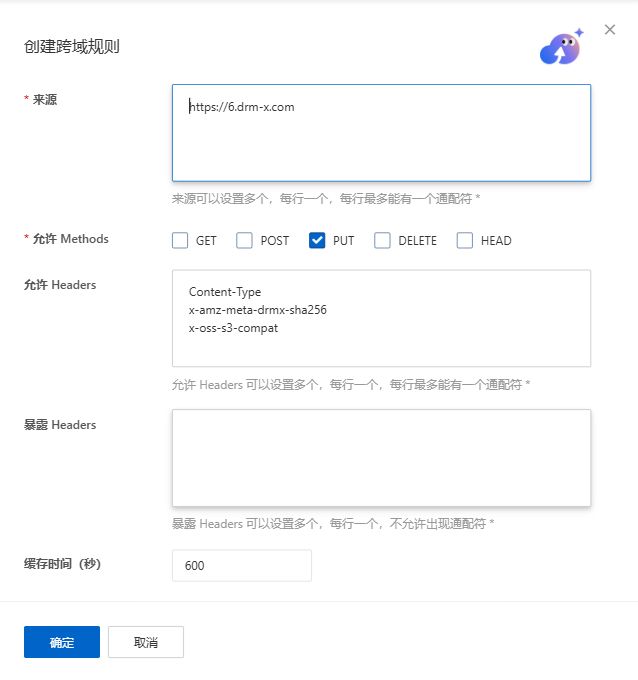
Open the bucket and choose Data Security → Cross-Origin Resource Sharing → Create Rule. Enter each allowed header on its own line. Keep any existing rules that serve other applications.
| Champ | Value or example |
|---|---|
| Origin | https://6.drm-x.com |
| Allowed methods | PUT |
| Allowed headers | Content-Typex-amz-meta-drmx-sha256x-oss-s3-compat |
| Cache time (seconds) | 600 |
Leave exposed headers empty for this upload rule and enable Vary: Origin. Save the rule. OSS validates the signature on each upload.
4. Set up HTTPS playback delivery#
- Use the built-in bucket HTTPS URL if it passes the playback checks in step 6. For direct playback, keep the bucket private and grant anonymous read access only to encrypted objects under
protected/where your OSS policy permits it. A custom domain or CDN is another option. Use private OSS origin access, configure DNS and TLS, and preserve the full object path. - On the final delivery host, allow
GETandHEADfrom the actual player website origins, allow theRangerequest header, and exposeETag,Content-Length,Content-RangeandAccept-Ranges. Confirm the delivery host serves byte ranges. - For example, object
protected/movie/manifest.mpdshould be available athttps://media.example.com/protected/movie/manifest.mpd. The playback host serves encrypted bytes. DRM license authorization controls decryption.
5. Connect and verify the destination#
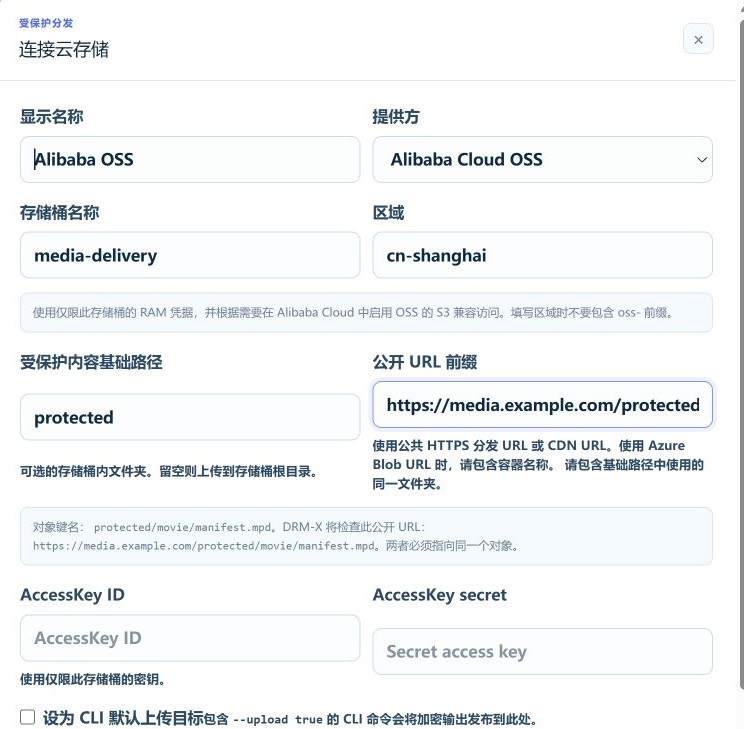
In DRM-X Console → Cloud Storage, select Connect storage and choose Alibaba Cloud OSS. Select the DRM-X environment where you publish packages.
| Champ | Value or example |
|---|---|
| Display name | Alibaba OSS |
| Bucket name | media-delivery |
| Region | cn-shanghai |
| Protected-content base path | protected |
| Public URL prefix | https://media.example.com/protected |
Replace the example name, region and HTTPS domain with your own values. Enter the region ID without the oss- prefix. Enter the RAM user’s AccessKey ID and AccessKey secret, then select Save and verify. A verified status confirms object listing.
6. Test playback and make OSS the default#
- Follow Publish your first cloud package with a short clip you can publish. Select the OSS destination for the new job. If you use the Console’s browser uploader, also test it with an already encrypted package.
- After publishing, check that the manifest and a segment load over HTTPS. Confirm a supported byte-range request returns
206 Partial Content. Use Test Playback with the new Content ID and verify playback and seeking. - In Cloud Storage, select the OSS connection and choose Make default. Check that the Default badge appears next to it. New CLI jobs using
--upload truewill use this destination by default.
Dépannage#
- Verification fails. Check the bucket name, region, RAM credentials, list permission and OSS S3 compatibility. If OSS returns
PublicEndpointForbidden, check whether the account is subject to Alibaba Cloud’s mainland endpoint restrictions. The current connector derives its API endpoint from the region. Contact DRM-X support if your account requires a custom upload API endpoint. - Browser upload fails. Check the PUT rule and the exact allowed headers, then check object write permission. Retry the upload to obtain a fresh signed URL.
- Playback fails after publishing. Check the HTTPS prefix, object path, CDN origin access, playback CORS and Range responses. Then check DRM license authorization using the same Content ID.