DRM-X 6.0
Web and HTML5 playback
Integrate DRM-X 6.0 protected Web playback with the Universal Player, qualified Shaka, PHP, ASP.NET Core, automatic DRM selection, and safe diagnostics.
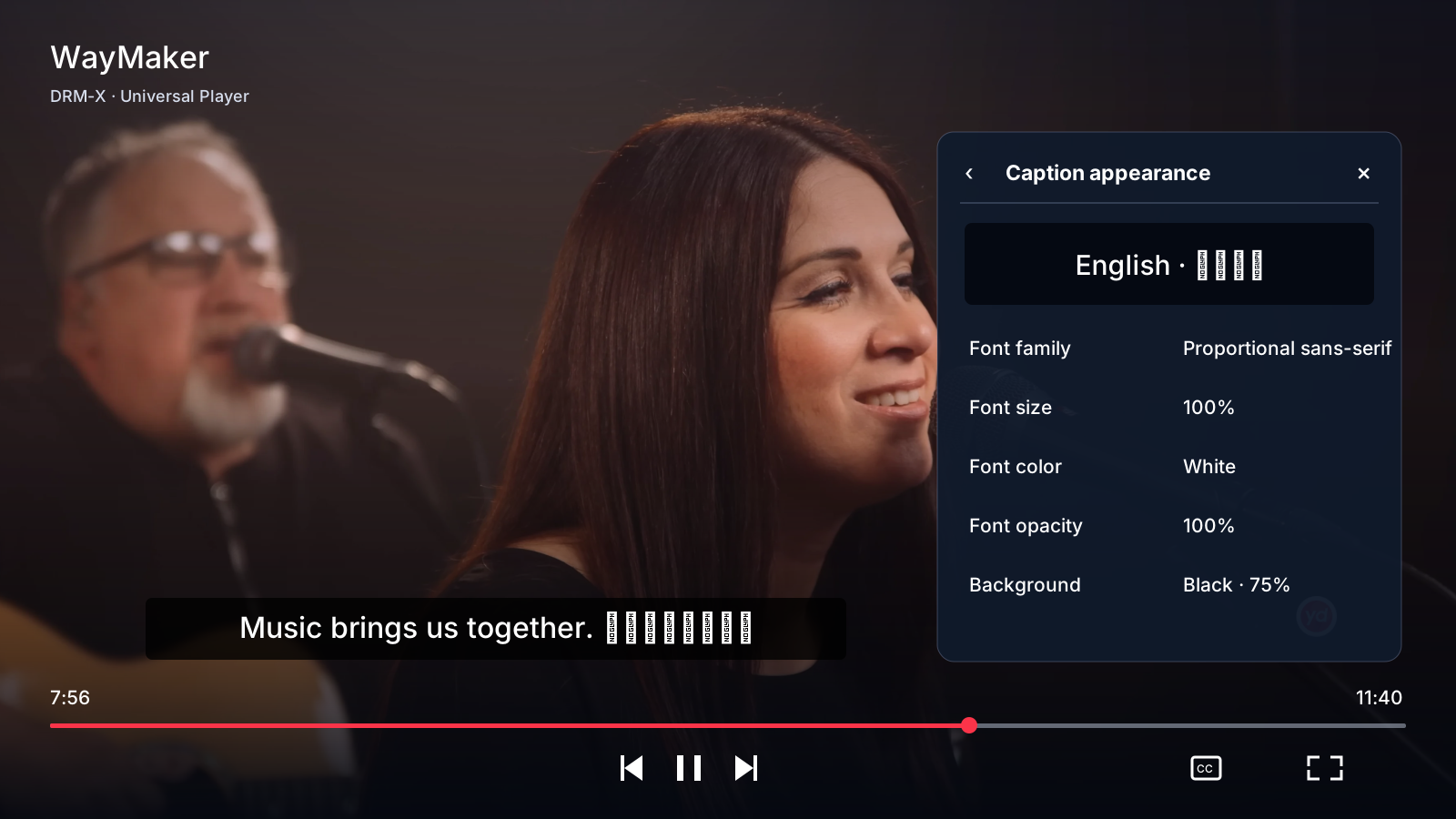
For UI customization, parameter defaults and lifecycle examples, read PLAYER-UI-CONFIGURATION.md. Stock player popup panels are opaque; caption and watermark opacity are separate.
Use Web SDK 1.2.0-beta.7 after your Published Content ID works in the DRM-X Web Player. Your website keeps its own login and viewing rules. Start with a complete backend integration kit, then add the component below.
Use the complete sample first#
The Web package contains the latest local Universal Player JavaScript and declarations, qualified Shaka, a runnable PHP application, a runnable ASP.NET Core example, and an integration README. Production pages may load Shaka and Universal Player from the DRM-X CDN; the package retains current local files for review, development, and controlled fallback.
- Set server-side Site ID, Site Key, and Access Key.
- Set the trusted Published protected file Content ID and named policy.
- Replace the sample login and entitlement decision with your business logic.
Minimal client boundary#
<drmx-universal-player
  content-id="your-published-content-id"
  session-endpoint="/api/drmx/playback-session">
</drmx-universal-player>
Load the qualified Shaka runtime and current Universal Player script from the complete kit before this component. The component calls your authenticated endpoint when the viewer presses Play. That endpoint checks your viewer session and entitlement, selects trusted content and policy, creates Contract v1 and returns it with Cache-Control: no-store.
Automatic DRM behavior#
- Windows Microsoft Edge prefers PlayReady. If the qualified PlayReady path fails before playback, Auto mode may use bounded Widevine fallback.
- Chrome and supported Android browsers use Widevine.
- Safari on iPhone and iPad uses native HLS FairPlay. On supported macOS Safari, qualified Shaka MSE FairPlay is preferred when available, with native HLS fallback.
- Compatible Huawei browsers use the qualified WisePlay path and conservative automatic quality behavior.
Production checklist#
- Serve everything over HTTPS and keep Access Keys in server secrets.
- Return playback-session responses with
Cache-Control: no-store. - Do not persist manifest URLs, tokens, or session responses in
localStorage. - Keep detailed redacted logs opt-in and time-bounded; do not record license bytes or authorization.
- Test physical Windows Edge, macOS Safari, iPhone/iPad Safari, Android, and every device class you advertise.
HTML5 playback with one Web Component#
<script
  src="https://drm-x6-cdn.1aicloud.com/shaka-player-5.2.4-drmx.2-6557ae581f1c.js"
  integrity="sha384-QzxDZ19XaYAL308fvtVjFjUX9RpRxtSfEZ1k1lm8FsRuML1MgNEORVMCtmToCFb8"
  crossorigin="anonymous"></script>
<script
  src="https://drm-x6-cdn.1aicloud.com/drmx-universal-player-1.2.0-beta.8-26bbb1dfef2c.js"
  integrity="sha384-tnp3UFe+6ZU/QKoKQq2zU8Z3J7BX+GI1/L+Z3Y8+AmJkYI3+owP6e+A4npzWIFdA"
  crossorigin="anonymous"></script>

<drmx-universal-player
  content-id="course-12-lesson-4"
  content-type="vod"
  session-endpoint="/api/drmx/playback-session">
</drmx-universal-player>
The browser calls only your authenticated same-origin endpoint. Auto chooses the appropriate supported DRM and registered DASH/HLS manifest. Bitrate, audio language/channel, subtitles, Picture-in-Picture, fullscreen, and playback speed are built in.
Using Shaka, Video.js, Bitmovin, or another EME player
Request Contract v1 from your backend, load manifestUrl, and add Authorization: Bearer {drmLicenseToken} only to DRM license and FairPlay certificate requests. Preserve the opaque challenge and license response bytes exactly. Use the returned release route when playback ends.
Universal Player playlists and shared controls#
The Web and Android editions use a consistent dark settings panel with compact blue controls. Playlists support next/previous, shuffle, repeat one/all and cancellable automatic advance. Every item uses a new authorized playback request. Chapter and transcript metadata comes from your content catalog.
Playback speed, sleep timer, captions, permitted quality, audio languages, session bookmarks and A–B looping are available. Web adds keyboard shortcuts, optional viewer-scoped local resume, transcript search and supported browser PiP. Android retains native Widevine offline downloads and renewal. Casting and cross-device progress require separate application integrations.
Professional and Enterprise logo settings
Branding stays off the video surface. Right-click the Web player, or open Settings → About player on either edition, to see the authorized logo, product information and player version. The round settings control and dark menu style are shared with Android. The fullscreen Web settings also contain a playlist selector.
Set playerBranding in your trusted backend to {"mode":"hidden"} or {"mode":"custom","logoUrl":"https://your-site.example/logo.png","label":"Your brand"}. The platform checks the active Professional or Enterprise subscription. Other plans use {"mode":"default"}; unauthorized custom/hidden requests return 403. This is separate from security watermarks.
The PHP download includes editable playlist and branding configuration. The Android customer ZIP includes the playlist callback example. Keep playlist authorization in your backend; never embed API client credentials in either player.
Optional phone-only 1080p limit#
Web SDK 1.2.0-beta.4 adds an optional phone limit. Leave it unset to retain current UHD behavior. Configure it before the first Play:
<drmx-universal-player
  content-id="your-published-content-id"
  session-endpoint="/api/drmx/playback-session"
  mobile-max-height="1080">
</drmx-universal-player>

// Equivalent component option; retained for subsequent playlist items:
await component.play({mobileMaximumHeight: 1080});
// Remove the option before a new playback:
await component.play({mobileMaximumHeight: null});

// Low-level API, for a video element you own:
await DrmXUniversalPlayer.start({
  video, contentId: 'your-published-content-id',
  sessionEndpoint: '/api/drmx/playback-session',
  mobileMaximumHeight: 1080
});
The option applies to detected phones. Tablets, desktops and TVs keep their previous ceiling. Detection uses browser hints and user-agent fallbacks; screen width does not decide resolution. If your host knows the device class, use device-class="phone" or deviceClass: "phone". Other supported values are auto, tablet, desktop and tv. Browser classification is advisory.
The SDK sends the lower platformCapabilities.maximumHeight before authorization. Your endpoint must forward or further narrow it. The returned ceiling must not exceed the request. Auto and manual quality choices stay within the permitted range, including after rotation, fullscreen, retries and playlist changes. Signed DRM policy and decoder restrictions may lower the result further. Values must be integers from 144 to 4320; unset or null disables this optional cap.
Safari requires filtered HLS
Use a backend that returns session-bound nativeHlsQuality.autoUrl and permitted quality URLs containing only eligible video renditions while retaining audio and subtitle groups. The current complete PHP sample implements this. A lower numeric ceiling with an unrestricted HLS master does not save bandwidth. The SDK rejects a raised ceiling or a capped FairPlay response without the required descriptor. Other backend integrations must implement the same contract before enabling this option.
Native SDK options
Apple Universal Player 1.0.0-beta.1 accepts mobileMaximumHeight: 1080 and applies it only to the native phone device class. Its endpoint must return a filtered master, which is checked before media loads. Android 1.0.0-beta.1 accepts mobileMaximumHeight = 1080 in WidevineCapabilities.playbackCapabilities; use clientPlatform = "android" for phones and explicit android-tablet or android-tv for other classes. Apply the corresponding offline capability limit to new downloads. Existing downloads are retained.
Verify your integration
- Package a source with 1080p and lower renditions plus UHD. Confirm it plays with the cap unset.
- Enable 1080 on a phone. Check the authorization ceiling, filtered master, Auto/manual menu and decoded video dimensions. No permitted choice should exceed 1080p.
- Test seeking, quality changes, audio, captions, ads and playlist advance. Stop playback and confirm the session is released.
- Use the same option on a desktop and tablet: the phone-only cap should not lower their ceiling. Existing policy or device limits still apply.
A resolution cap does not set a bitrate or guarantee a fixed saving. If a rule must withstand altered browser requests, enforce it in your trusted backend and matching DRM policy. Never treat a client device hint as proof. Missing eligible renditions must fail; do not silently fall back to UHD.
Consistent fullscreen controls on iPhone Safari#
Web SDK 1.2.0-beta.4 keeps the Web Player controls in fullscreen, including on the PHP advertising page. On iPhone it uses element fullscreen when supported or expands the player inside the page. Browser bars may remain. It does not switch to the iPhone video-only player. Use the same Settings menu for quality, audio languages and subtitles on every platform.
Audio and subtitle choices show the current media track state and update after native HLS applies a change. CC off/on retains the last selected subtitle language. Advertisement controls remain separate while a break runs; the regular playback controls return when content resumes.
Test quality, languages and ads#
- Start playback with a real tap or click. Browser autoplay and sound rules still apply.
- Open Settings and check the current Quality, Audio and Subtitles selections. Auto uses the permitted ladder; manual choices cannot raise the authorized ceiling.
- Change the audio language, select a subtitle language, then turn CC off and on. Confirm that labels reflect the active tracks and the subtitle preference is retained.
- Enter fullscreen on iPhone Safari and Edge. The Web Player keeps its shared controls; iPhone may expand inside the page with browser bars still visible.
- If your integration uses ads, test the configured break before, during and after content, including a quality change. The PHP advertisement page provides a test lab. Built-in demo ads and Google IMA are separate modes; confirm that the chosen ad service loads in each supported browser.
For the bandwidth option, follow Optional phone-only 1080p limit. Leave it unset to keep existing UHD behavior. A resolution limit does not set a fixed bitrate or guarantee a percentage saving.