# Web and HTML5 playback
Integrate DRM-X 6.0 protected Web playback with the Universal Player, qualified Shaka, PHP, ASP.NET Core, automatic DRM selection, and safe diagnostics.
Canonical: https://docs.drm-x.com/sdk/web
Updated: 2026-09-05
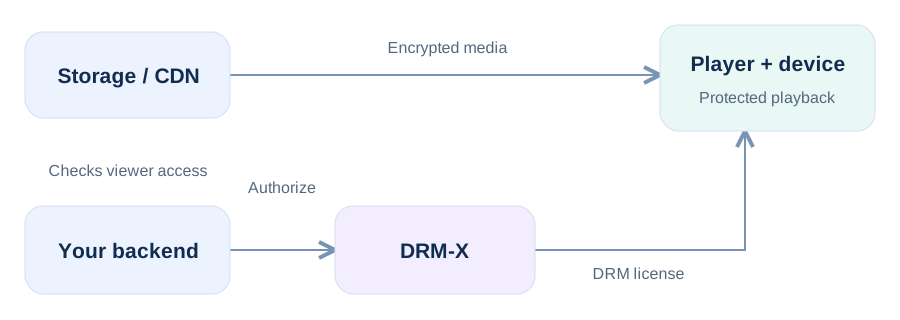Your backend decides access; DRM-X enforces the signed policy. Encrypted media and DRM licenses follow separate delivery paths.
## Use the complete sample first[#](#use-the-complete-sample-first)
The Web package contains the latest local Universal Player JavaScript and declarations, qualified Shaka, a runnable PHP application, a runnable ASP.NET Core example, and an integration README. Production pages may load Shaka and Universal Player from the DRM-X CDN; the package retains current local files for review, development, and controlled fallback.
- Set server-side Site ID, Site Key, and Access Key.
- Set the trusted Published protected file Content ID and named policy.
- Replace the sample login and entitlement decision with your business logic.
## Minimal client boundary[#](#minimal-client-boundary)
```
```
**The browser does not choose security**Your backend maps the authenticated user and trusted catalog reference to the DRM-X Content ID and policy template.
## Automatic DRM behavior[#](#automatic-drm-behavior)
- Windows Microsoft Edge prefers PlayReady. If the qualified PlayReady path fails before playback, Auto mode may use bounded Widevine fallback.
- Chrome and supported Android browsers use Widevine.
- Safari on iPhone and iPad uses native HLS FairPlay. On supported macOS Safari, qualified Shaka MSE FairPlay is preferred when available, with native HLS fallback.
- Compatible Huawei browsers use the qualified WisePlay path and conservative automatic quality behavior.
## Production checklist[#](#production-checklist)
- Serve everything over HTTPS and keep Access Keys in server secrets.
- Return playback-session responses with `Cache-Control: no-store`.
- Do not persist manifest URLs, tokens, or session responses in `localStorage`.
- Keep detailed redacted logs opt-in and time-bounded; do not record license bytes or authorization.
- Test physical Windows Edge, macOS Safari, iPhone/iPad Safari, Android, and every device class you advertise.
Web SDK
## HTML5 playback with one Web Component[#](#html5-playback-with-one-web-component)
```
```
The browser calls only your authenticated same-origin endpoint. Auto chooses the appropriate supported DRM and registered DASH/HLS manifest. Bitrate, audio language/channel, subtitles, Picture-in-Picture, fullscreen, and playback speed are built in.
### Using Shaka, Video.js, Bitmovin, or another EME player
Request Contract v1 from your backend, load `manifestUrl`, and add `Authorization: Bearer {drmLicenseToken}` only to DRM license and FairPlay certificate requests. Preserve the opaque challenge and license response bytes exactly. Use the returned release route when playback ends.