 DRM-X 6.0
Android SDK and native Media3
Download the Android player with in-video controls, draggable playlists, saved shuffle/repeat and offline resume. Integrate protected playback using DRM-X or native Media3.
Try the PHP demo using DEMO-QUICKSTART.md in your SDK ZIP. For your own content, integrate your website/backend first, then use MOBILE-AND-TV-APPS.md to connect your app to the same login and viewing rules.
Try the Android player#
1.0.0-preview.40 · 12.10 MB · Android 6.0+ (API 23+) · DRM-X 6.0 Player · Updated 16 October 2026
- Open this page on your Android phone and download the APK.
- Open the downloaded file. If Android asks, allow installation from the browser or file manager you used, then tap Install.
- Open DRM-X 6.0 Player, stay connected, and tap the video's Play button. The app requests a streaming license when you press Play.
- Open Settings to choose quality, audio, captions or playback speed. Rotate the phone to continue in full screen.
- Choose Try offline downloads to open the offline demonstration library. Tap Download or Download playlist, then choose the available video quality and audio track. Available subtitles are included. The customer backend sets the quality ceiling; compatible hardware-secure phones can test 4K when licensed and supported. Software DRM retains its security limits. Play offline opens the completed local playlist with next/previous, shuffle, repeat and autoplay; Go online returns to the full playlist. Renew renews the selected license while connected.
Already queued media downloads continue in the background. If Android stops the app while preparing licenses or tracks, reopen it while connected to finish preparing the remaining items. Existing downloads are retained. Offline playback uses only cached media; incomplete or expired downloads require completion or renewal.
The sample APK is public and signed for evaluation. The AAR and full SDK below remain available through eligible Console accounts. Keep your own production app signing key and backend login separate from this demo.
APK checksum and USB installation
SHA-256:
e71edc274c76c381fa628ab4fe177a468ba85ce9daac23944b8bf0393d2a21b6With Android platform-tools and an authorized USB device:
adb install -r drmx-android-player-1.0.0-preview.40.apkInstall this APK over the existing official sample without uninstalling it. The same signing key and application ID preserve downloads, offline licenses, saved positions and preferences. If your own build uses another signing key, use a separate application ID to keep both apps and preserve the sample's offline licenses.
Download controls and language names in preview.40#
Connect to the internet before starting a download. Choose the permitted video quality and audio track in the download dialog; available subtitles are included. Audio and subtitle menus display each language in its own language, such as English and 中文. Customer configuration and device DRM support determine the available quality ceiling.
Select a title and tap Delete download, then confirm Delete to remove its encrypted media and local license references from this device. Cancel keeps it. Deletion works offline and retains the other downloaded titles. Reconnect to download that title again with a different quality or audio track.
New downloads require an internet connection. A queued transfer can pause when connectivity disappears and resume after reconnection. Completed downloads play offline while their device-bound licenses remain valid. Playlist posters and seek-preview thumbnails remain cached as described below.
Offline artwork and downloads in preview.39#
Playlist posters and seek-preview thumbnails are saved on the device with their artwork metadata. They remain available after closing and reopening the app without a network connection. After upgrading, open the offline demonstration library once while connected and allow the images to load; existing encrypted videos do not need to be downloaded again.
Wait for each video to finish downloading, then switch off both Wi-Fi and mobile data and choose Play offline. Test the downloaded playlist, selected audio and included captions. Reconnect before using Renew when a stored license needs renewal. Install this update over the existing sample to retain its downloads and settings.
Publisher images must be available while connected before they can appear offline. Images use a bounded 96 MiB app-private store, separate from encrypted media and licenses; older artwork can be evicted when this store fills. Missing images do not bypass DRM or prevent an otherwise valid downloaded video from playing.
Live DRM in preview.13#
Released 17 September 2026. The phone app and customer SDK include 4K Live DRM Test. Live playback uses fresh manifests and cannot be downloaded. The test event is available only during an active broadcast. Follow the AWS and OBS setup guide to create your own event.
What is new in Android player preview.12#
Released 14 September 2026. Fixes downloaded playback making an unexpected license request when a Widevine license is expired or has one minute or less remaining. This could appear as Media3 error 6004, an HTTP error while connected, or a DNS error while disconnected.
The player now restores the downloaded license locally. Valid licenses retain their remaining playback time; expired licenses show Connect and tap Renew. License validity and protection rules remain enforced by the device. Diagnostics also include the numeric HTTP status when a network operation fails, without exposing request headers, URLs or license responses.
- Install preview.12 over the existing official app. Keep your current app data and downloads.
- If WayMaker or another downloaded video needs renewal, connect to the internet, select that video and tap Renew.
- Wait for License renewed. Ready to play offline., then choose Play offline. The encrypted video remains downloaded.
This release retains preview.11's controls and playlist features. The public evaluation app and its embedded player identify preview.12; at that release, the separately distributed Console SDK was preview.10 / bundle 20260910.8.
What is new in Android player preview.11#
Released 14 September 2026. This evaluation app includes the latest player controls and playlist improvements, with a consistent interaction style across our Android and Apple players.
- Controls inside the video: centered Play/Pause, Previous and Next for multi-video playlists, CC, Settings and a full-screen button. Controls hide after two seconds while playing; tap the video to reveal them again.
- Captions and playback settings: use CC to show or hide available subtitles, and Settings to choose caption language, audio, playback speed and permitted quality. Offline choices use only tracks included in the download.
- Drag to reorder: drag a playlist item's handle to change its position. The saved order survives an app restart and is reflected in the downloaded playlist. Reordering keeps the current video playing. Tap the handle for accessible Move up / Move down actions.
- Saved shuffle and repeat: selected modes stay highlighted and survive restarts in online and offline playback. With shuffle and repeat both off, videos follow the saved order and stop after the final item. The playlist menu's “Play next” action has been removed.
- Resume where you stopped: each video's saved VOD position is restored when you return to streaming or downloaded playback. Progress is saved on this device for the current viewer; it does not synchronize between devices.
Organize playlists, save their order and resume playback. Offline viewing requires a completed download and a usable, unexpired offline license.
The preview.11 release updated the public evaluation APK. The current Console SDK is 1.0.0-preview.14, bundle 20260928.4; the integration instructions below use that bundle.
1. Choose an integration path#
Use DrmXPlayer, the phone sample and the offline manager. Keep your own login and business rules.
PATH B · KEEP YOUR UIMedia3 + DRM-X helpersKeep an existing player and download stack. Let DrmXOfflineManager manage persistent licenses.
PATH C · NATIVE ONLYMedia3 without the AARImplement the same backend contract and native license lifecycle yourself. No DRM-X player dependency.
Download from Developer Tools → Device SDKs. SDK use requires active Professional or Enterprise access, including approved Professional evaluations. Standard retains native APIs for your own player. SDK access is checked at session creation and license renewal; offline licenses expire no later than the account service period.
Current preview: 1.0.0-preview.14 · customer bundle 20260928.4 · Media3 1.11.0. The ZIP contains a local Maven repository, Gradle wrapper, annotated README, phone/TV/native samples, an installable phone sample APK in apks/, and offline integration notes. It contains no customer credentials or protected movies.
2. Prepare your content and backend#
- Package and publish a Widevine-compatible encrypted DASH title in your DRM-X Environment. Copy its exact Published Content ID.
- Configure your server's Environment ID, Site Key and Access Key. Use the downloadable PHP integration for a working starting point.
- Implement your user login and entitlement check. Your app calls your backend with its short-lived user token; your backend chooses the content, policy and trusted URLs.
- Run online playback first on a physical Widevine-capable device. Add offline acquisition only after the streaming contract works.
Encrypted video and DRM licenses follow separate paths
The CDN delivers encrypted video. Your backend checks access, and the DRM license service authorizes decryption on a compatible device.
- Storage / CDN
Delivers encrypted media to the player.
- Your backend
Checks whether the viewer is allowed to watch and requests playback authorization from DRM-X.
- DRM-X
Validates the playback authorization and handles the DRM license request.
- Player + device
Uses the device's DRM system to obtain a license and play the encrypted media.
| Change this value | Where it belongs | Meaning |
|---|---|---|
| sessionEndpoint | Android | Your HTTPS playback-session endpoint, not the raw license server URL. |
| offlineEndpoint | Android, offline only | Your acquire/renew/release authorization endpoint. |
| contentId | Android request; backend validates | The Published protected Content ID the viewer is entitled to access. |
| customer access token | App memory after login | Your short-lived user token, never a Site Key or Access Key. |
| Environment ID, Site Key, Access Key | Server secret configuration only | DRM-X account credentials. Never ship them in an APK, HTML or source control. |
| Policy and trusted manifest URL | Your backend | Business entitlement and package mapping. Do not accept these from the app. |
3. Install and run the SDK#
Open the extracted ZIP's root folder in Android Studio. Use JDK 17, Android SDK 36 and Android Gradle Plugin 9.2.0; the included wrapper uses Gradle 9.4.1. Minimum device API is 23. Build dependencies require internet access. Select samples.phone and Run. Its initial values use the public demo backend and title; follow its sign-in and streaming controls before switching to your own backend.
# Windows
gradlew.bat :samples:phone:assembleDebug
# macOS / Linux
sh gradlew :samples:phone:assembleDebug
For an existing app, copy the ZIP's maven/ folder into your project root. In settings.gradle.kts:
dependencyResolutionManagement {
    repositories {
        maven { url = uri(rootDir.resolve("maven")) }
        google()
        mavenCentral()
    }
}
In your app module's build.gradle.kts:
dependencies {
    implementation("com.haihaisoft.drmx:drmx-universal-player:1.0.0-preview.14")
}
Installing the standalone AAR instead
Put the AAR in your app module's libs/. A flat AAR has no automatic transitive dependency resolution, so add the three matching Media3 dependencies yourself. Do not install both forms.
implementation(files("libs/drmx-universal-player-1.0.0-preview.14.aar"))
implementation("androidx.media3:media3-exoplayer:1.11.0")
implementation("androidx.media3:media3-exoplayer-dash:1.11.0")
implementation("androidx.media3:media3-ui:1.11.0")
In AndroidManifest.xml, allow internet access and disable backups for this minimal sample. In a production app that needs backups, specifically exclude device-bound offline license metadata instead.
<uses-permission android:name="android.permission.INTERNET" />
<application android:allowBackup="false" android:usesCleartextTraffic="false" ... >
Search the phone sample's MainActivity.kt for drmx.sessionEndpoint, drmx.offlineEndpoint, drmx.contentId and customer.loginEndpoint. Change the marked fallback settings, or pass these Intent extras from your application after login. Pass customer.accessToken at runtime. The ZIP README explains each parameter and which demo hooks to replace.
Build a test APK using the AAR#
This example uses the runnable phone project from the full SDK ZIP and explicitly links the standalone AAR. The same approach works for an existing Android app.
- Download and extract the full Android SDK ZIP. Open its root folder in Android Studio.
- Keep
libs/drmx-universal-player-1.0.0-preview.14.aarin the extracted root. Use JDK 17, Android SDK 36 and the included Gradle wrapper. - In
samples/phone/build.gradle.kts, replace the DRM-X Maven dependency with the following entries insidedependencies. Keep the rest of that build file.
implementation(files(rootProject.file("libs/drmx-universal-player-1.0.0-preview.14.aar")))
implementation("androidx.media3:media3-exoplayer:1.11.0")
implementation("androidx.media3:media3-exoplayer-dash:1.11.0")
implementation("androidx.media3:media3-ui:1.11.0")
Remove implementation("com.haihaisoft.drmx:drmx-universal-player:1.0.0-preview.14") so the same SDK is not included twice. A flat AAR needs the three Media3 dependencies shown above.
- To keep the downloaded demo installed alongside your own test build, change the phone module's
applicationIdtocom.example.drmxtest. Leave its namespace unchanged for this supplied sample. - Build the APK, then install it on a USB-connected Android device with USB debugging authorized.
# Windows, from the extracted SDK root
gradlew.bat :samples:phone:assembleDebug
adb install -r samples/phone/build/outputs/apk/debug/phone-debug.apk

# macOS / Linux
sh gradlew :samples:phone:assembleDebug
adb install -r samples/phone/build/outputs/apk/debug/phone-debug.apk
Open the test app and tap Play. The supplied phone source uses the same public demo initially. To test your own title, replace the marked session/offline/login endpoints and Published Content ID in MainActivity.kt, and supply your own user's short-lived authentication at runtime. Your server keeps the Site Key and Access Key.
The compact controls come from DrmXPlayerView in the AAR. The supplied Activity demonstrates Play-to-authorize, responsive rotation, download ownership, offline playback and renewal. See the control integration example below when adding this view to your own app.
4. Server request and default policy#
The Android app asks your backend for a playback session. Your backend authenticates the user, verifies entitlement, maps Content ID to published media and calls DRM-X. See Playback Session API for the complete streaming contract.
{
  "contentId": "YOUR-PUBLISHED-CONTENT-ID",
  "contentType": "vod",
  "drmSystem": "widevine",
  "playbackMode": "streaming",
  "platformCapabilities": {
    "clientPlatform": "android",
    "drmSystems": ["widevine"], "manifestTypes": ["dash"],
    "maximumHeight": 1080, "secureDecoder": false, "persistentState": false
  }
}
The conservative capabilities above do not assert Widevine L1. Use the SDK's capability helper, or your own device assessment, for actual devices. Client capabilities assist compatibility selection; they never grant quality entitlement.
The PHP sample defaults to multi-tier-standard for online playback. Select its documented single-key policy when your package uses one key. Your policy must match the package key model and the viewer's rights. Change the server configuration or its DRMX_LICENSE_POLICY_TEMPLATE environment setting, not a query parameter in the player. See license policies.
playback_policy.persistent to true in the server-issued policy and choose license, rental, playback and renewal durations. The reference uses 7 days / 3 days / 48 hours / 7 days respectively; these are example business rules, not studio approval or a platform-wide default. Return matching metadata. The Widevine license remains authoritative.5. Path A: play through DrmXPlayer#
Inside your Activity, create a PlayerView, use a secure window and call prepare after login. The wrapper exchanges the session, configures Widevine, applies the returned maximum height and releases the streaming reservation when stopped. Imports come from com.haihaisoft.drmx.player and AndroidX Media3.
val view = PlayerView(this)
setContentView(view)
DrmXPlayer.protectWindow(window)
val player = DrmXPlayer(this, view)
val capabilities = WidevineCapabilities.playbackCapabilities(
    clientPlatform = "android",
    displayMetrics = resources.displayMetrics,
    applicationVersion = "1.0",
)
player.prepare(
    endpoint = "https://customer.example/api/drmx/playback-session",
    contentId = "YOUR-PUBLISHED-CONTENT-ID",
    contentType = "vod", // use live only for a published live title
    capabilities = capabilities,
    customerAuthenticationHeaders = mapOf("Authorization" to "Bearer $userToken"),
)
// Keep player as an Activity/Fragment-owned field in your actual application.
// Stop when your playback lifecycle ends; close when the owner is destroyed.
// player.stop()
// player.close()
Register DrmXPlayerListener for authorizing, ready, playing and error UI. Display safe error codes rather than dumping license tokens or response bodies. Use the included phone sample for the complete lifecycle, full-screen controls and download queue.
Player controls and uninterrupted rotation#
Tap Play on the video to begin authorization. Opening the screen or Settings does not acquire a streaming license. Pause/resume, changing settings and rotating the phone preserve the current session.
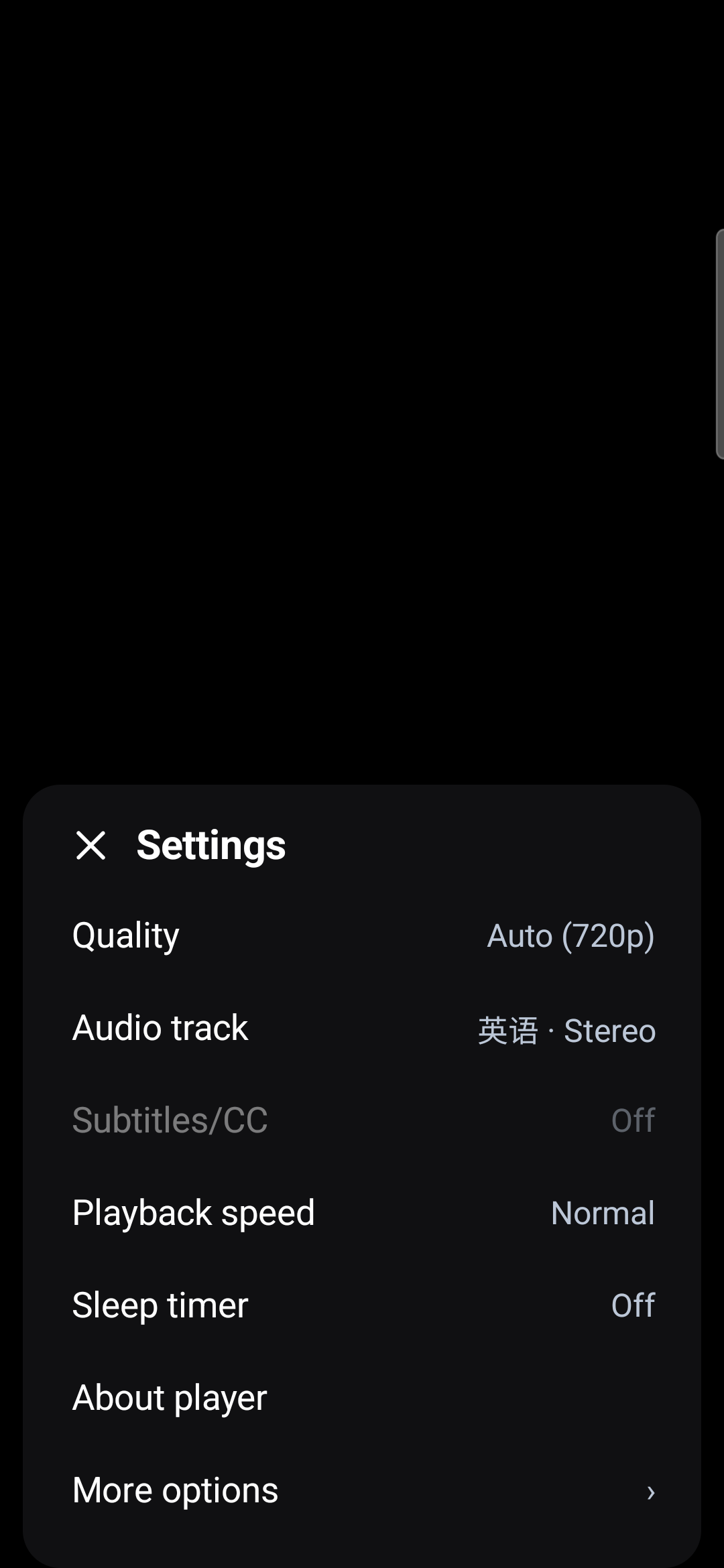
| Control | What customers can do |
|---|---|
| Quality | Choose Auto or a supported, licensed resolution from the manifest. Unavailable options explain the license or device/DRM restriction. Auto obeys the same restrictions. |
| Audio track | Choose any supported audio language supplied by the package. |
| Subtitles/CC | Choose a caption language or Off. The CC button appears when supported captions exist and toggles them directly. |
| Caption appearance | Adjust font, text color and size, background/window colors and opacity. Preferences are saved on the device. |
| Playback speed / sleep timer | Play at 0.25–2× speed or pause automatically after a chosen interval. |
| Seek / full screen | Scrub the timeline, seek 10 seconds, or double-tap either side. Rotate to landscape without restarting playback. |
The three compact actions below the picture are Download (for offline use), Play offline and Renew (the offline license). The sample downloads one permitted video rendition and the supported audio/subtitle tracks; offline menus expose only downloaded media. Renewal requires connectivity.
Copy log beside the information footer copies recent errors as text, so you can send support the details without a screenshot. Reports contain a report ID, operation, SDK/Android/device version, numeric CDM/Media3 errors, selected stack frames, connection/download/playback state and a repeat count. They exclude credentials, media URLs, keys, key-set IDs, license data and full CDM dumps.
The sample retains up to 32 local reports (64 KB) for five hours. When connected and signed in, it uploads pending errors to the configured customer backend, at most once per 30 seconds. The public demo server retains warnings/errors for five hours, combines repeated events, caps the file at 512 KB and prunes every minute. Routine progress and successful playback are not logged. Custom integrations must explicitly supply their own same-origin drmx.diagnosticsEndpoint; diagnostic errors never interrupt playback.
val player = DrmXPlayer(this)
val controls = DrmXPlayerView(this)
controls.bind(player) // Does not acquire a session or license.
controls.onPlayRequested = {
    player.prepare(endpoint = sessionEndpoint, contentId = contentId,
        capabilities = capabilities, customerAuthenticationHeaders = userHeaders)
}
controls.onFullScreenRequested = { /* resize the existing player view */ }
player.listener = object : DrmXPlayerListener {
    override fun onAuthorizing(contentId: String) { controls.setPreparing(true) }
    override fun onReady(info: DrmXPlaybackInfo) { controls.setPreparing(false) }
    override fun onError(error: PlaybackSessionException) { controls.setPreparing(false) }
}
// Keep protectWindow(window) and the secure video surface.
// At final owner destruction: controls.unbind(); player.close()
The supplied phone manifest handles orientation and screen-size changes; its onConfigurationChanged resizes the same Activity and player. Keep both parts when adapting it. A host that recreates Activities should retain its playback owner and reattach the view. Process death is different from rotation and needs normal state restoration. The 4K/8K options require matching content, license entitlement and device/DRM support; the CDM remains authoritative.
For custom players, stop and release the active offline DRM session before checking, renewing or releasing the same persistent license. The SDK's player.stopForOfflineLicenseOperation { /* call manager here */ } waits for the Media3 playback queue to release the media. Plain stop() queues that work asynchronously. Do not perform a separate checkLicense() while the same license is playing; playback itself validates its CDM state. The supplied sample shows the complete handoff and disables overlapping actions during renewal.
6. Acquire a license and download the media#
Prepare for offline playback
A complete download and a valid device-bound license are both required.
- Download encrypted media
While online, download the video and the audio and subtitle tracks you need.
- Acquire a persistent license
While online, obtain the device-bound Widevine license. Store its opaque Key-set ID privately.
- Check readiness
Confirm that the download is complete and the license is valid.
- Play offline
Read the cached media and restore the local license. Renewal and release require an internet connection.
val offlineManager = DrmXOfflineManager(applicationContext)
val capabilities = WidevineCapabilities.offlinePlaybackCapabilities(
    clientPlatform = "android", // android-tv or android-automotive where applicable
    displayMetrics = resources.displayMetrics,
    applicationVersion = "1.0",
)
offlineManager.acquireLicense(
    endpoint = offlineEndpoint,
    contentId = contentId,
    capabilities = capabilities,
    customerAuthenticationHeaders = customerHeaders,
) { result ->
    result.onSuccess { stored ->
        // Next: select tracks <= stored.maximumHeight and queue their download.
        // Acquisition alone does not download the video.
    }.onFailure { /* show a safe retry/error state */ }
}
The SDK saves the opaque Widevine key-set ID and non-secret metadata. The CDM holds the license. It does not persist DRM License Tokens, raw keys, challenges or license response bytes. Exclude com.haihaisoft.drmx.offline.licenses.v1.xml from backups.
Create one application-owned Media3 SimpleCache, download manager and database. Use DownloadHelper with the licensed MediaItem and select video within maximumHeight. In Media3 1.11 the prepared callback is onPrepared(helper, tracksInfoUpdated). The phone sample's enqueueDownload and OfflineTestRuntime show the runnable implementation.
// Inside DownloadHelper's prepared callback, after selecting licensed video:
helper.addAudioLanguagesToSelection("en", "zh-Hans", "zh")
helper.addTextLanguagesToSelection(true, "en", "zh-Hans", "zh")
val selected = helper.getDownloadRequest(offlineLicenseId, byteArrayOf())
val request = offlineManager.createDownloadRequest(contentId, selected.streamKeys)
downloadManager.addDownload(request)
helper.release()
Download every language you intend to expose offline. Calling createDownloadRequest without stream keys downloads all tracks, which is generally wasteful for adaptive video. Show download progress and wait for Download.STATE_COMPLETED. For production background transfers, integrate Media3 DownloadService, storage limits and Android foreground-service/notification requirements; the demo queue runs in-process.
7. Path B: restore with your existing Media3 player#
Read the completed download and use its exact stream keys. The download and playback stack must share the same cache location and key mapping. This example deliberately disables upstream access for strict offline playback:
val cacheOnly = CacheDataSource.Factory()
    .setCache(downloadCache)
    .setUpstreamDataSourceFactory(null)
val mediaSourceFactory = DefaultMediaSourceFactory(this)
    .setDataSourceFactory(cacheOnly)
val nativePlayer = ExoPlayer.Builder(this)
    .setMediaSourceFactory(mediaSourceFactory)
    .build()
val completed = downloadIndex.getDownload(offlineLicenseId)
require(completed?.state == Download.STATE_COMPLETED)
val playback = offlineManager.createPlayback(contentId, streamKeys = completed!!.request.streamKeys)
nativePlayer.setMediaItem(playback.mediaItem)
nativePlayer.prepare()
nativePlayer.play()
// Release nativePlayer when the owner is destroyed.
To use the same offline flow with Path A, construct DrmXPlayer with this mediaSourceFactory and call player.prepareOffline(playback). Ordinary restoration uses the local CDM license without requesting a new one. A missing cache entry should produce an error during disconnected acceptance, not silently switch to the internet.
8. Path C: native Media3, no DRM-X AAR#
You are not required to use DrmXPlayer or DrmXOfflineManager. Add the three Media3 dependencies from step 3 and implement the same customer backend contract. Use session.manifestUrl (not session.manifest.url), the returned license URL and short-lived authorization headers. Apply the returned maximum height and handle streaming session release on stop, replacement, end, failure and destruction.
The complete native Activity below is compiled as samples:native alongside this SDK release. It handles HTTPS, bounded response reads, background authorization, stale responses and reservation release. Replace the marked endpoint/Content ID and supply your own login token. The example is a starting point; add your production refresh, account-switch and app-navigation lifecycle.
Complete native streaming Activity (Kotlin, no DRM-X dependency)
package com.haihaisoft.drmx.samples.nativeplayer

import android.app.Activity
import android.os.Bundle
import android.view.WindowManager
import android.widget.Button
import android.widget.LinearLayout
import android.widget.TextView
import androidx.media3.common.C
import androidx.media3.common.MediaItem
import androidx.media3.common.PlaybackException
import androidx.media3.common.Player
import androidx.media3.common.util.UnstableApi
import androidx.media3.exoplayer.ExoPlayer
import androidx.media3.ui.PlayerView
import org.json.JSONObject
import java.net.HttpURLConnection
import java.net.URI
import java.util.concurrent.Executors
import java.util.concurrent.atomic.AtomicBoolean

/** Complete native streaming example. No DRM-X AAR or server credentials. */
@UnstableApi
class MainActivity : Activity() {
    private lateinit var player: ExoPlayer
    private lateinit var status: TextView
    private val worker = Executors.newSingleThreadExecutor()
    private val closed = AtomicBoolean(false)
    private var activeSession: JSONObject? = null
    private var requesting = false
    private var generation = 0
    // CUSTOMIZE: use YOUR authenticated customer backend and Published Content ID.
    // The sample can receive these after your application's login via Intent extras.
    // Never replace the app login token with a DRM-X Site Key or Access Key.
    private val endpoint get() = intent.getStringExtra("drmx.sessionEndpoint")
        ?: "https://customer.example/api/drmx/playback-session"
    private val contentId get() = intent.getStringExtra("drmx.contentId") ?: "YOUR-PUBLISHED-CONTENT-ID"
    private val customerToken get() = intent.getStringExtra("customer.accessToken").orEmpty()

    override fun onCreate(state: Bundle?) {
        super.onCreate(state)
        window.addFlags(WindowManager.LayoutParams.FLAG_SECURE)
        val root = LinearLayout(this).apply { orientation = LinearLayout.VERTICAL; fitsSystemWindows = true; setPadding(24, 24, 24, 24) }
        status = TextView(this).apply { text = "Native Media3 · connect your backend, then Play"; textSize = 16f }
        val view = PlayerView(this)
        player = ExoPlayer.Builder(this).build(); view.player = player
        root.addView(status)
        root.addView(view, LinearLayout.LayoutParams(-1, 0, 1f))
        root.addView(Button(this).apply { text = "Play protected video"; setOnClickListener { startPlayback() } })
        root.addView(Button(this).apply { text = "Stop & release session"; setOnClickListener { stopPlayback() } })
        setContentView(root)
        player.addListener(object : Player.Listener {
            override fun onPlayerError(error: PlaybackException) { status.text = "Playback error: ${error.errorCodeName}"; releaseSession() }
            override fun onPlaybackStateChanged(state: Int) { if (state == Player.STATE_ENDED) releaseSession() }
        })
    }

    private fun startPlayback() {
        if (requesting) return
        stopPlayback(); requesting = true; status.text = "Authorizing…"
        val attempt = generation
        val request = JSONObject().put("contentId", contentId).put("contentType", "vod")
            .put("drmSystem", "widevine").put("playbackMode", "streaming")
            .put("platformCapabilities", JSONObject().put("clientPlatform", "android")
                .put("drmSystems", org.json.JSONArray(listOf("widevine")))
                .put("manifestTypes", org.json.JSONArray(listOf("dash")))
                .put("maximumHeight", 1080).put("secureDecoder", false).put("persistentState", false))
        val headers = if (customerToken.isBlank()) emptyMap() else mapOf("Authorization" to "Bearer $customerToken")
        worker.execute {
            val result = runCatching { JSONObject(post(endpoint, request.toString(), headers)) }
            runOnUiThread {
                requesting = false
                result.onSuccess { session ->
                    if (closed.get() || attempt != generation) { workerRelease(session); return@onSuccess }
                    // Keep release information even if contract validation fails.
                    activeSession = session
                    runCatching {
                        require(session.getInt("contractVersion") == 1 && session.getString("contentId") == contentId)
                        require(session.getString("drmSystem") == "widevine" && session.getString("playbackMode") == "streaming")
                        val drm = session.getJSONObject("drm")
                        require(drm.getString("system") == "widevine")
                        val maximumHeight = session.getJSONObject("policy").getInt("maximumHeight")
                        require(maximumHeight in 1..4320)
                        val mediaItem = MediaItem.Builder().setUri(https(session.getString("manifestUrl")))
                            .setMimeType("application/dash+xml")
                            .setDrmConfiguration(MediaItem.DrmConfiguration.Builder(C.WIDEVINE_UUID)
                                .setLicenseUri(https(drm.getString("licenseServerUrl")))
                                .setForceDefaultLicenseUri(true).setLicenseRequestHeaders(authorization(drm))
                                .setMultiSession(false).build()).build()
                        player.trackSelectionParameters = player.trackSelectionParameters.buildUpon()
                            .setMaxVideoSize(Int.MAX_VALUE, maximumHeight).setPreferredAudioLanguages("en")
                            .setTrackTypeDisabled(C.TRACK_TYPE_TEXT, true).build()
                        player.setMediaItem(mediaItem); player.prepare(); player.play()
                        status.text = "Native Media3 · protected playback"
                    }.onFailure { status.text = "Invalid session contract. Check your backend."; releaseSession() }
                }.onFailure { if (!closed.get()) status.text = "Authorization failed. Check login, Content ID, policy, and network." }
            }
        }
    }

    private fun releaseSession() { activeSession?.let(::workerRelease); activeSession = null }
    private fun workerRelease(session: JSONObject) {
        // A bounded release may finish after Activity destruction, including a
        // session response that arrived after the user left the screen.
        Thread({ runCatching {
            val release = session.getJSONObject("release")
            val headers = if (release.has("authorization")) authorization(release)
                else authorization(session.getJSONObject("drm"))
            post(release.getString("url"), "", headers)
        } }, "drmx-native-release").start()
    }
    private fun stopPlayback() { generation++; player.stop(); player.clearMediaItems(); releaseSession() }
    override fun onStop() { stopPlayback(); super.onStop() }
    override fun onDestroy() { closed.set(true); stopPlayback(); player.release(); worker.shutdown(); super.onDestroy() }

    companion object {
        fun https(url: String): String {
            val uri = URI(url); require(uri.scheme == "https" && uri.host != null && uri.userInfo == null)
            return url
        }
        fun authorization(drm: JSONObject): Map<String, String> {
            val auth = drm.optJSONObject("authorization")
            val name = auth?.getString("headerName") ?: "Authorization"
            val scheme = auth?.getString("scheme") ?: drm.optString("tokenType", "Bearer")
            val value = auth?.getString("value") ?: drm.getString("drmLicenseToken")
            require(name.matches(Regex("^[A-Za-z0-9-]{1,64}$")) && scheme.matches(Regex("^[A-Za-z][A-Za-z0-9._-]{0,31}$")))
            require(value.isNotBlank() && !value.contains('\r') && !value.contains('\n'))
            return mapOf(name to "$scheme $value")
        }
        fun post(url: String, body: String, headers: Map<String, String>): String {
            val connection = URI(https(url)).toURL().openConnection() as HttpURLConnection
            try {
                connection.requestMethod = "POST"; connection.instanceFollowRedirects = false
                connection.connectTimeout = 5000; connection.readTimeout = 15000; connection.doOutput = true
                connection.setRequestProperty("Content-Type", "application/json")
                headers.forEach { (name, value) -> connection.setRequestProperty(name, value) }
                connection.outputStream.use { it.write(body.toByteArray(Charsets.UTF_8)) }
                require(connection.responseCode in 200..299) { "Customer request rejected" }
                return connection.inputStream.use { stream ->
                    val output = java.io.ByteArrayOutputStream(); val buffer = ByteArray(8192)
                    while (true) {
                        val count = stream.read(buffer); if (count < 0) break
                        require(output.size() + count <= 1_048_576); output.write(buffer, 0, count)
                    }
                    output.toString("UTF-8")
                }
            } finally { connection.disconnect() }
        }
    }
}
For native offline licensing, use OfflineLicenseHelper.downloadLicense, persist its opaque key-set ID privately and restore with MediaItem.DrmConfiguration.Builder(C.WIDEVINE_UUID).setKeySetId(id). The following compiled helper covers acquisition, duration checks, renewal, release and download/playback items. It is not a complete download application: you still own the cache, download service, progress, metadata, user/device binding and trusted operation authorization.
Native persistent-license helper (Kotlin, no DRM-X dependency)
package com.haihaisoft.drmx.samples.nativeplayer

import android.content.Context
import android.util.Base64
import androidx.media3.common.C
import androidx.media3.common.MediaItem
import androidx.media3.common.StreamKey
import androidx.media3.common.util.UnstableApi
import androidx.media3.datasource.DefaultHttpDataSource
import androidx.media3.exoplayer.dash.DashUtil
import androidx.media3.exoplayer.drm.DrmSessionEventListener
import androidx.media3.exoplayer.drm.OfflineLicenseHelper
import androidx.media3.exoplayer.offline.DownloadRequest
import org.json.JSONObject

/** Native Media3 alternative: no DRM-X AAR. Call blocking operations on a worker.
 * Application owns downloads/cache, user/device entitlement, progress and lifecycle.
 * Never persist the session, request headers, tokens, challenges or license bytes.
 */
@UnstableApi
class NativeOfflineLicense(context: Context) {
    private val storage = context.getSharedPreferences("native.offline.keysets", Context.MODE_PRIVATE)
    private val upstream = DefaultHttpDataSource.Factory().setConnectTimeoutMs(10000).setReadTimeoutMs(20000)

    // session is the validated response from YOUR offline-license-session endpoint.
    fun acquire(session: JSONObject): ByteArray {
        validate(session)
        val contentId = session.getString("contentId")
        require(!storage.contains(contentId)) { "Renew or release the stored license before acquiring again" }
        val source = upstream.createDataSource()
        val manifest = DashUtil.loadManifest(source, android.net.Uri.parse(MainActivity.https(session.getString("manifestUrl"))))
        val format = DashUtil.loadFormatWithDrmInitData(upstream.createDataSource(), manifest.getPeriod(0))
            ?: error("Missing Widevine initialization data")
        val helper = helper(session)
        try {
            val id = helper.downloadLicense(format)
            save(contentId, id)
            return id
        } finally { helper.release() }
    }

    fun renew(contentId: String, freshSession: JSONObject) {
        validate(freshSession); require(freshSession.getString("contentId") == contentId)
        val helper = helper(freshSession)
        try { save(contentId, helper.renewLicense(keySet(contentId))) } finally { helper.release() }
    }

    // Local CDM check only. No token or network license URI is used.
    fun remainingSeconds(contentId: String): Pair<Long, Long> {
        val config = MediaItem.DrmConfiguration.Builder(C.WIDEVINE_UUID).build()
        val helper = OfflineLicenseHelper.newWidevineInstance(config, upstream, DrmSessionEventListener.EventDispatcher())
        try {
            val remaining = helper.getLicenseDurationRemainingSec(keySet(contentId))
            return Pair(remaining.first, remaining.second)
        } finally { helper.release() }
    }

    fun release(contentId: String, freshSession: JSONObject) {
        validate(freshSession); require(freshSession.getString("contentId") == contentId)
        val helper = helper(freshSession)
        try {
            helper.releaseLicense(keySet(contentId))
            check(storage.edit().remove(contentId).commit())
        } finally { helper.release() }
    }

    fun downloadRequest(contentId: String, downloadId: String, manifestUrl: String, streamKeys: List<StreamKey>): DownloadRequest {
        require(streamKeys.isNotEmpty()) { "Select policy-compliant video, audio and subtitle tracks first" }
        return DownloadRequest.Builder(downloadId, android.net.Uri.parse(MainActivity.https(manifestUrl)))
            .setMimeType("application/dash+xml").setStreamKeys(streamKeys).setKeySetId(keySet(contentId)).build()
    }

    fun mediaItem(contentId: String, manifestUrl: String, streamKeys: List<StreamKey>): MediaItem = MediaItem.Builder()
        .setUri(MainActivity.https(manifestUrl)).setMimeType("application/dash+xml").setStreamKeys(streamKeys)
        .setDrmConfiguration(MediaItem.DrmConfiguration.Builder(C.WIDEVINE_UUID).setKeySetId(keySet(contentId)).build()).build()

    private fun helper(session: JSONObject): OfflineLicenseHelper {
        val drm = session.getJSONObject("drm")
        // Use HTTP license headers, NOT Widevine optional key-request parameters.
        val config = MediaItem.DrmConfiguration.Builder(C.WIDEVINE_UUID)
            .setLicenseUri(MainActivity.https(drm.getString("licenseServerUrl")))
            .setForceDefaultLicenseUri(true).setLicenseRequestHeaders(MainActivity.authorization(drm)).build()
        return OfflineLicenseHelper.newWidevineInstance(config, upstream, DrmSessionEventListener.EventDispatcher())
    }
    private fun validate(session: JSONObject) {
        require(session.getInt("contractVersion") == 1 && session.getString("playbackMode") == "offline")
        require(session.getString("drmSystem") == "widevine" && session.getString("contentType") == "vod")
        require(session.getJSONObject("policy").getBoolean("persistent"))
    }
    private fun keySet(contentId: String): ByteArray = Base64.decode(storage.getString(contentId, null)
        ?: error("No device-bound license for this content"), Base64.NO_WRAP)
    private fun save(contentId: String, id: ByteArray) {
        check(storage.edit().putString(contentId, Base64.encodeToString(id, Base64.NO_WRAP)).commit())
    }
}
Before calling this low-level helper, validate that the fresh backend response matches the requested Content ID, operation, signed-in user/device and authorization validity period. Persist a stable offlineLicenseId and trusted manifest/track metadata alongside the key-set ID, never the token. Run blocking helper calls on a worker thread. For license HTTP headers use setLicenseRequestHeaders on the DRM configuration; Widevine optional key-request parameters are a different map.
New integrations should use AndroidX Media3 DRM support. Legacy com.google.android.exoplayer2 projects should follow the official migration guide; do not mix legacy and AndroidX classes or assume the sample compiles unchanged against older versions.
9. Check, renew, release and switch languages#
These are separate actions. Run one at a time after the active offline DRM session has been released: use player.stopForOfflineLicenseOperation { /* one operation below */ } with DrmXPlayer, or release the existing native Media3 player first. Do not check a license while it is playing. A check is optional for displaying durations; it must not prevent renewal of an expired license.
offlineManager.checkLicense(contentId) { result ->
    result.onSuccess { license ->
        if (license.state == DrmXOfflineLicenseState.EXPIRED) {
            // Require renewal online before offering offline playback.
        }
    }
}
offlineManager.renewLicense(offlineEndpoint, contentId, capabilities, customerHeaders) {
    /* update duration and UI after success; show retry on failure */
}
// Only when the customer requests deletion/release:
offlineManager.releaseLicense(offlineEndpoint, contentId, capabilities, customerHeaders) {
    /* after success, remove the corresponding encrypted download */
}
getStoredLicense reads metadata; checkLicense queries authoritative local CDM durations. Renew/release require connectivity and a fresh operation-specific authorization from your backend. Deleting media does not release the license. When disconnected, queue release for the next connection rather than reporting that the server has confirmed it. Close the manager when its owner is destroyed.
// Use player.media3Player for the DRM-X wrapper; nativePlayer for plain Media3.
nativePlayer.trackSelectionParameters = nativePlayer.trackSelectionParameters
    .buildUpon()
    .setPreferredAudioLanguages("en") // Chinese: "zh-Hans", "zh"
    .setPreferredTextLanguages("en")  // choose a packaged/downloaded language
    .setTrackTypeDisabled(C.TRACK_TYPE_TEXT, false) // true = subtitles Off
    .build()
Build choices from actual available tracks and disable unavailable choices. A preference cannot create an English track absent from the package. Offline users can only select downloaded languages. Preserve license/cache state across screen rotation; full screen is a view/window change, not a reason to acquire another license.
10. Implement the offline authorization endpoint#
The app posts contentId, contentType: "vod", drmSystem: "widevine", playbackMode: "offline", operation: "acquire" | "renew" | "release", offlineLicenseId (null for initial acquisition) and truthful platformCapabilities. Verify that renew/release IDs belong to the authenticated user, device and content. Select policy server-side, issue a fresh DRM License Token and return the matching contract:
{
  "contractVersion": 1, "playbackMode": "offline",
  "offlineLicenseId": "YOUR-STABLE-USER-DEVICE-CONTENT-RECORD",
  "contentId": "YOUR-PUBLISHED-CONTENT-ID", "contentType": "vod",
  "drmSystem": "widevine",
  "manifestUrl": "https://media.customer.example/title/manifest.mpd",
  "authorizationExpiresAt": "YOUR-FRESH-UTC-EXPIRY",
  "drm": {
    "system": "widevine",
    "licenseServerUrl": "https://license6.drm-x.com/v1/licenses/widevine",
    "integrationMode": "direct-token",
    "drmLicenseToken": "SHORT-LIVED-OPERATION-AUTHORIZATION",
    "tokenType": "Bearer"
  },
  "policy": {
    "persistent": true, "renewAllowed": true, "maximumHeight": 1080,
    "allowedTrackTypes": ["AUDIO", "SD", "HD"],
    "licenseDurationSeconds": 604800, "rentalDurationSeconds": 259200,
    "playbackDurationSeconds": 172800, "renewalDurationSeconds": 604800
  }
}
These are explanatory placeholders, not a reusable license response. Return fresh values from the actual operation. The SDK also supports integrationMode: "token-proxy" with a bounded drm.authorization descriptor. Return Cache-Control: no-store; never log successful authorization bodies. See the downloadable SDK's OFFLINE_INTEGRATION.md and PHP sample's offline endpoint for concrete request handling.
11. Test your devices and troubleshoot#
| Test / symptom | Expected behavior / next check |
|---|---|
| SDK download returns 403 | Select an organization with an active Professional or Enterprise subscription. A planned upgrade after trial does not unlock the SDK. |
| Session 401 / 403 | Check login, entitlement, Environment, Published Content ID and policy. Never bypass authentication. |
| Offline fails but online works | Check CDM durations, completed download, cache location, stream keys and all required licensed keys. |
| English / Chinese missing | Check package language metadata, actual tracks and offline language selection. |
| L1, HDCP or decoder failure | Check physical hardware, provisioning, codec and output requirements. A capability string is not certification. |
| Reboot, rotation, upgrade | Persistent license and cache survive supported lifecycle changes without duplicate acquisition. Backups must not migrate licenses to a new device. |
| Airplane mode | Disable Wi-Fi and mobile data too; restart the app, play locally and switch every promised language. |
| Expiry, storage pressure, account switch | Show a clear unavailable/renew state, recover incomplete media, and enforce user/device access without leaking another user's offline catalog. |
Qualify each supported phone, tablet, Android TV/Google TV, Fire TV or embedded Android model for Widevine, secure decoding, codec/resolution, HDCP, external displays, clock changes and long disconnection. Not every Android device has the same DRM capabilities. Hollywood content requires the rights holder's protection and device requirements, not just successful decoding.
Universal Player playlists and shared controls#
The Android preview.11 and later evaluation apps and current Android/Apple development sources share in-video Previous/Play-Pause/Next, CC, Settings and fullscreen controls with two-second hiding during playback. Android's playlist menu no longer includes “Play next”. Selected shuffle/repeat settings remain highlighted and persist across restarts. With both off, playback follows the saved playlist order and stops at the final video. Drag handles reorder items without restarting the current video; the saved order also applies to the downloaded playlist. These APIs are included in the Console SDK preview.14 bundle.
Supply the same customer/viewer storageNamespace to DrmXPlayer and playerView.storageNamespace before setting the playlist. VOD progress is saved periodically and on pause/stop, then restored for that Content ID in streaming or downloaded playback. Live playback does not use a saved VOD position. Completed downloads retain the same shuffle/repeat/resume behavior without a network media source. This device-local state does not synchronize progress between devices.
The Web and Android editions use a consistent dark settings panel with compact blue controls. Playlists support next/previous, shuffle, repeat one/all and cancellable automatic advance. Every item uses a new authorized playback request. Chapter and transcript metadata comes from your content catalog.
Playback speed, sleep timer, captions, permitted quality, audio languages, session bookmarks and A–B looping are available. Web adds keyboard shortcuts, optional viewer-scoped local resume, transcript search and supported browser PiP. Android retains native Widevine offline downloads and renewal. Casting and cross-device progress require separate application integrations.
Professional and Enterprise logo settings
Branding stays off the video surface. Open Settings → About player for the authorized logo, product information and player version. Web also offers this information on right-click. The public phone demo includes WayMaker, Goodness of God, Fresh Oil and 4K Test Video; every selection receives its own authorization.
Set playerBranding in your trusted backend to {"mode":"hidden"} or {"mode":"custom","logoUrl":"https://your-site.example/logo.png","label":"Your brand"}. The platform checks the active Professional or Enterprise subscription. Other plans use {"mode":"default"}; unauthorized custom/hidden requests return 403. This is separate from security watermarks.
The PHP download includes editable playlist and branding configuration. The Android customer ZIP includes the playlist callback example. Keep playlist authorization in your backend; never embed API client credentials in either player.