 DRM-X 6.0
Apple FairPlay integration
Integrate DRM-X 6.0 FairPlay Streaming on iOS, iPadOS, tvOS, and Safari using Swift, AVFoundation, SPC and CKC exchange, and secure server authorization.
FairPlay certificate and license exchange
Keep the SPC and CKC binary data unchanged throughout the exchange.
- Certificate
Load the application certificate from the authorized URL.
- SPC
Use the certificate and HLS identifier to create the device's SPC request.
- CKC
Send the SPC to the authorized license URL and receive the CKC response.
- AVFoundation
Pass the CKC to AVFoundation to play the encrypted video.
For UI customization, parameter defaults and lifecycle examples, read PLAYER-UI-CONFIGURATION.md. Stock player popup panels are opaque; caption and watermark opacity are separate.
Try the PHP demo using DEMO-QUICKSTART.md in your SDK ZIP. For your own content, integrate your website/backend first, then use MOBILE-AND-TV-APPS.md to connect your app to the same login and viewing rules.
iOS / iPadOS: run the sample step by step#
- Download and extract the Apple SDK ZIP.Keep
Package.swift,Sources,TestsandSamplestogether. OpenSamples/DrmXAppleSamples.xcodeprojon your Mac. - Choose DrmXiOS.In Xcode's scheme menu select DrmXiOS. The minimum deployment target is iOS/iPadOS 15. Use Xcode 26.3 to reproduce this release's build checks.
- Set your signing team.In the app target, open Signing & Capabilities, select your team and use a bundle identifier belonging to you. The package contains no signing identity.
- Connect a physical device.Pair your iPhone/iPad through Xcode Devices and Simulators, enable Developer Mode when requested, and select the device as the run destination.
- Start with CUSTOMER-INTEGRATION.md in your SDK download: connect your login, published Content IDs and viewing rules before running the customer sample. Demo content is only for evaluation.
- Connect your own app.Follow the package README: add the extracted directory through File → Add Package Dependencies → Add Local and select the DrmXFairPlay product. Replace demo authentication, endpoint and Content IDs with your own.
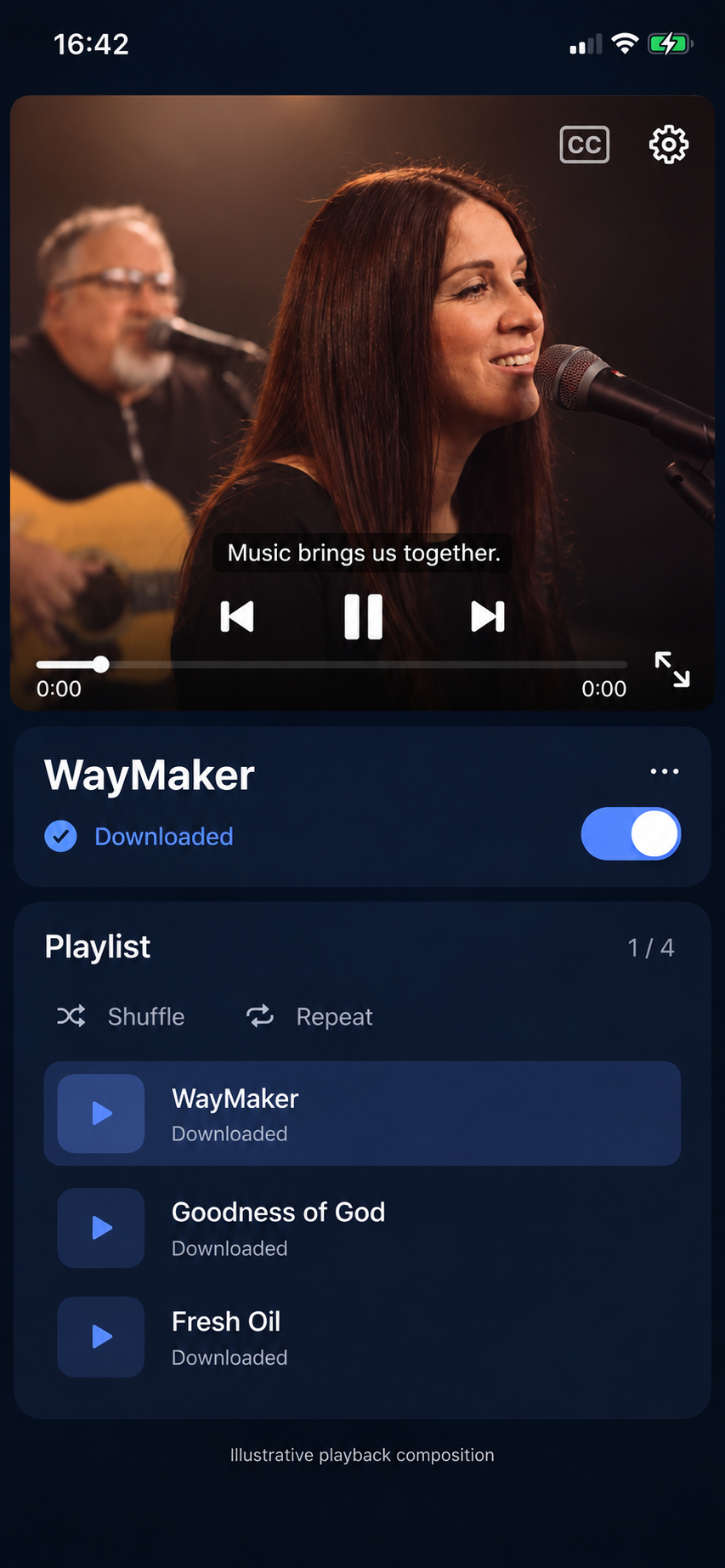
Retain DrmXUniversalPlayer with @StateObject or an owning coordinator; do not recreate it inside a recomputing SwiftUI body. Supply the signed-in viewer's token through the authentication callback. Stop on final screen dismissal or sign-out.
Apple TV: run the tvOS sample#
- Use the same Apple ZIP.Open the sample Xcode project and choose the DrmXtvOS scheme. Set your team and unique bundle identifier on the tvOS target.
- Pair your Apple TV.Connect through Xcode Devices and Simulators using Apple's pairing flow. Choose the physical Apple TV and Build and Run.
- Use the remote.Select a VOD from the playlist and press Select/Play. Move focus to seek, captions, audio/settings and full screen. Test Back and playlist changes.
- Add your content.Use the same Swift Package and authenticated FairPlay backend as iOS. Return your registered HLS/CBCS manifest and supported output policy.
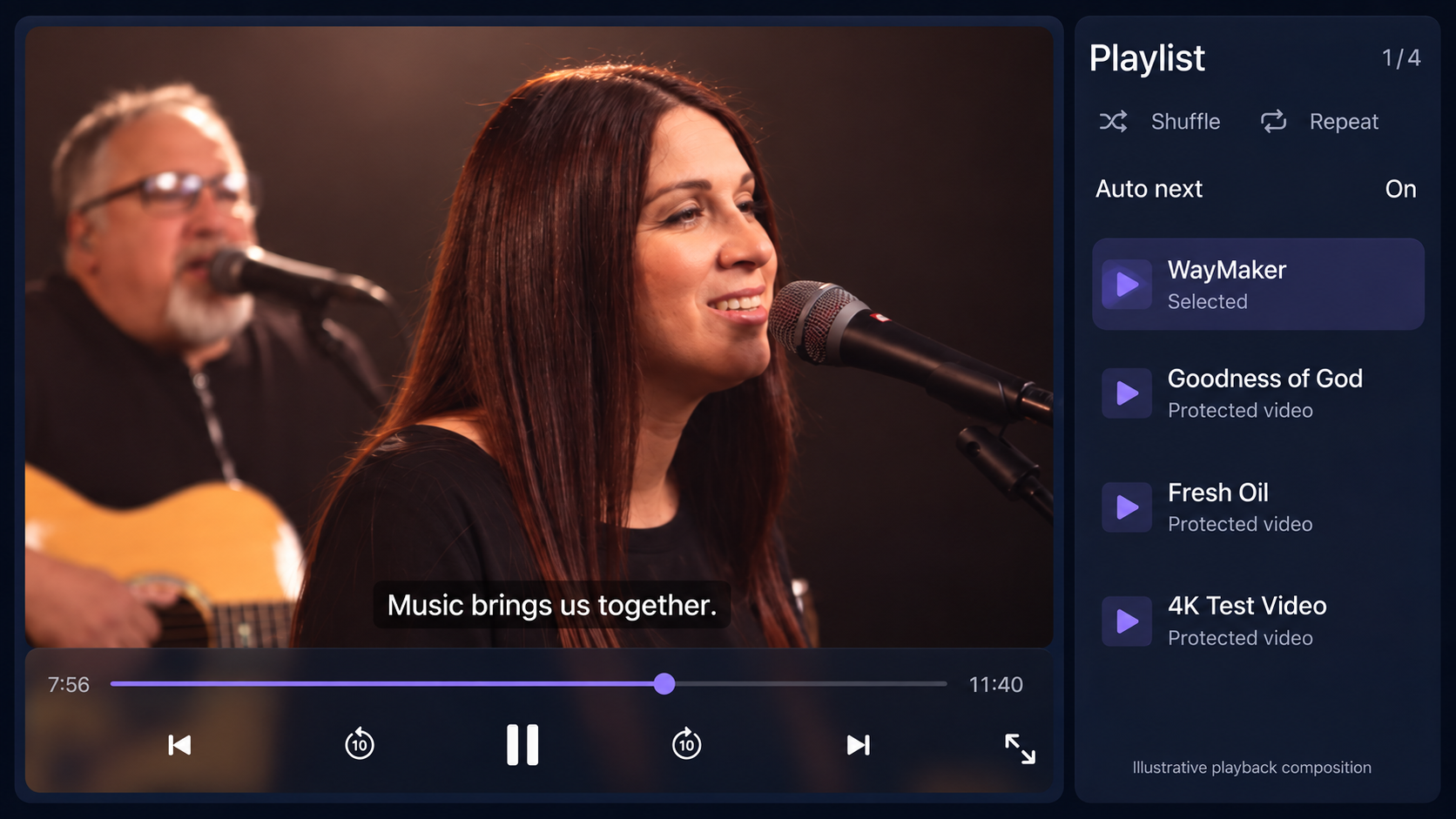
tvOS is streaming-only in this package. Apple's HLS asset download API used for iOS offline playback is unavailable on tvOS. iOS/tvOS simulators can verify layouts; use signed physical devices to test FairPlay. There is no public IPA or TestFlight download.
Each video menu contains Move up / Move down and Download online or Delete offline. Completed downloads disable Download. The Downloaded videos switch selects offline playback; only cached tracks are available. There are no separate download, delete or playlist-download buttons.
Register FairPlay before integration#
Configure the FairPlay deployment and certificate material in DRM-X Console. Private key material remains encrypted and server-side. Publish an HLS/CBCS variant for the Content ID you plan to test.
Request the Apple session#
Send drmSystem: fairplay, manifestTypes: ["hls"], and the appropriate clientPlatform from your authenticated backend. The response provides the registered HLS manifest, certificate route, CKC license route, authorization instructions, and session-release endpoint.
AVFoundation sequence#
- Load the certificate.Fetch it from the returned FairPlay certificate URL with the returned short-lived authorization.
- Build content-key data.Use the
skd://identifier supplied by the HLS playlist and the application certificate. - Send the SPC.POST exact SPC bytes to the returned license URL and accept exact CKC bytes.
- Finish and release.Respond to the content-key request, then release the DRM-X session when viewing ends.
Safari and app acceptance#
- Test iPhone and iPad Safari with native HLS FairPlay.
- Test macOS Safari with qualified Shaka MSE FairPlay where available and native HLS fallback.
- Test native iOS, iPadOS, and tvOS playback, AirPlay policy, AV adapter policy, background transitions, renewal, and output changes.
- Use different Development and Production FairPlay deployments and credentials.
iOS, iPadOS, and tvOS with native FairPlay#
The Swift Package targets iOS and tvOS 15+. It uses AVFoundation’s AVContentKeySession for FairPlay content-key requests, with certificate retrieval, binary SPC/CKC exchange, renewal, cancellation, and session release.
import AVKit
import DrmXFairPlay

let controller = DrmXFairPlayPlayer()
let player = try await controller.prepare(
    endpoint: URL(string: "https://customer.example/api/drmx/playback-session")!,
    contentId: "course-12-lesson-4",
    contentType: .vod,
    customerHeaders: ["Authorization": "Bearer \(customerAccessToken)"]
)
playerViewController.player = player
player.play()
Your backend selects the policy template. Do not put a policy, manifest URL, Site Key, Access Key, or long-lived token in the app bundle. Test real HLS/CBCS media on physical iPhone, iPad, and Apple TV devices, including HDMI and AirPlay decisions.
One package, three integration choices#
Use Universal Player for iOS/iPadOS, Universal Player for tvOS, or the native AVPlayer integration above. All use the same DrmXFairPlay package and customer playback-session endpoint. The host application supplies customer authentication; tenant credentials remain on your backend.
The streaming player provides playlists, shuffle/repeat, cancellable auto-next, resume positions, seeking, speed, quality preferences, audio/subtitle selection, caption sizing, bookmarks, optional chapters/transcripts, A–B loops, sleep timers, and fullscreen. Its layout adapts to touch screens and the Apple TV remote.
let playlist = try DrmXPlaylist(items: [
    DrmXPlaylistItem(contentId: "lesson-1", title: "Getting started"),
    DrmXPlaylistItem(contentId: "lesson-2", title: "Next lesson")
])
let model = DrmXUniversalPlayer(
    endpoint: URL(string: "https://customer.example/api/drmx/playback-session")!,
    playlist: playlist,
    storageNamespace: "your-tenant-and-viewer"
) {
    ["Authorization": "Bearer \(customerAccessToken)"]
}
// Retain the model with @StateObject or an owning coordinator.
DrmXUniversalPlayerView(model: model)
// Stop when the owning screen is actually dismissed.
model.stop()
Quality settings are maximum preferences within the returned session ceiling. AVPlayer adapts to available bandwidth; FairPlay licenses and output restrictions remain authoritative. Positions and bookmarks persist by customer/viewer namespace without storing playback credentials.
The current development source places Previous/Play-Pause/Next, CC, Settings and fullscreen inside the video. Controls hide after two seconds during playback and reappear on touch or remote interaction. Shuffle, repeat and VOD progress persist within the supplied customer/viewer namespace, including downloaded playback. With shuffle and repeat off, the queue stops after its final video.
Protected downloads on iPhone and iPad
Pass an authenticated offlineEndpoint to DrmXUniversalPlayer to enable Download and downloaded-video mode. The iOS implementation uses AVAssetDownloadURLSession for local HLS packages and AVContentKeySession for device-bound persistent FairPlay keys. It stores opaque native keys and local metadata, never DRM License Tokens or clear keys. Downloads are isolated by customer/viewer namespace. The offline queue contains completed catalog items and shares saved positions, shuffle and repeat. License renewal requires fresh online authorization; removal erases only the selected download.
The PHP sample supports fairplay/hls/ios persistent requests. Configure each content item's trusted hlsManifestUrl; the certificate route uses the active deployment in the newly issued token. FairPlay enforces expiry. Offline quality remains the downloaded quality, and only cached language tracks are selectable. tvOS uses the streaming player.
Screen capture qualification
Use iPad and Apple TV simulators for layout, playlist controls, settings, and remote navigation. FairPlay playback is unavailable in these simulators; the SDK reports this limitation and releases its reservation instead of creating an unsupported native key session. Simulator UI results do not establish protected playback, offline download support, or physical-device acceptance.
The player pauses audio/video when iOS reports active recording or mirroring and covers inactive scenes. A screenshot notification arrives after capture and cannot redact an already saved image.